---
title: "Automated CSRF detection"
description: "Automatically detect CSRF with a browser extension"
date: 2016-06-15
tags: ["web security","csrf"]
lang: en
url: https://bugs.cc/posts/automated-detection-of-csrf/
translation: https://bugs.cc/zh/posts/automated-detection-of-csrf/
---
# Automated CSRF detection
## 0x00 Intro
***
I previously wrote an automated XSS detection extension. Today, an automated CSRF detection extension. CSRF shows up in several ways, and this post cannot cover all of them, for example JSON Hijacking (I will cover that in part 2 or 3). This chapter is about CSRF caused by form elements.
The biggest difference between detecting form CSRF and detecting form XSS is: XSS needs a submit to detect, CSRF only needs to analyze the form.
## 0x01 Preparation
***
If we are going to write this, we need a demo that approximates a real environment. As 0x00 said, this chapter is only about forms, so the demo is a pile of different forms. As shown:
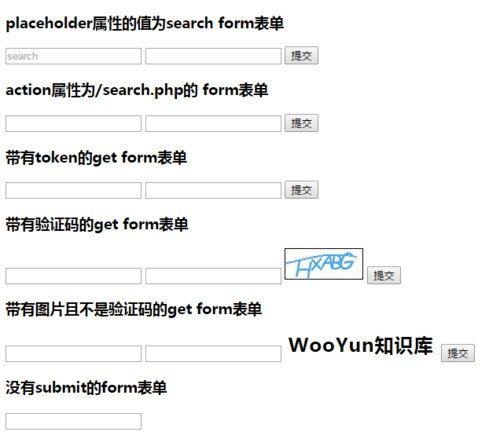
This covers most form types you see on the web. If you notice a type that is missing, tell me and I will add it in the next version.
First, iterate every form on the page. Code:
```js
outerFor:
for(var i = 0;i < $("form").length;i++){
var formDom = $("form").eq(i); // formDom is the form element for this iteration
var imageFileSuffix = ['.jpg','.png','.jpge','.ico','.gif','.bmp']; // image-suffix whitelist, used to check whether an image is a captcha
var placeholderFilterKeyword = ['跳','搜','查','找','登陆','注册','search']; // useless-form blacklist, used to check whether this form is useful (input-based check); these keywords match Chinese form placeholder text
var actionFilterKeyword = ['search','find','login','reg']; // useless-form blacklist, used to check whether this form is useful (form-action-based check)
}
```
Why `outerFor:`? This is only the outer for loop. There are more loops inside. The label lets us skip this outer iteration from the innermost loop. In the innermost loop I use `continue outerFor;` to skip the current outer iteration. (If that did not click, go back one sentence and read it again. This matters.)
## 0x02 Filter out search, page-jump, and other useless forms
***
First, imagine special forms, for example a form with no action, where JavaScript sends the request. That pattern is common, so I first check whether action exists:
```js
if(formDom.attr("action") != undefined){
// when action is not empty, proceed to the next step
}
```
Then use JavaScript `some` on action. If the action value matches a string in the blacklist we set earlier, skip it with `continue`, which jumps out of this iteration of the loop whose init variable is `i`. In code:
```js
if(formDom.attr("action") != undefined){
var actionCheck = actionFilterKeyword.some(function(item,index){
return (formDom.attr("action").toLowerCase().indexOf(item) != "-1");
})
if(actionCheck){
continue;
}
}
```
If you are unclear on `some`, see: [https://msdn.microsoft.com/zh-cn/library/ff679978(v=vs.94).aspx](https://msdn.microsoft.com/zh-cn/library/ff679978(v=vs.94).aspx)
JavaScript is case-sensitive, so the code above uses `toLowerCase()` to lowercase the action value, then searches it for the action blacklist. The comparison looks like this:
> action value -- search (if this comparison is true, it will not compare further)
> action value -- find
> ...
The return value is a boolean. *Professional JavaScript for Web Developers* describes `some` as:
`Runs the given function on each item in the array and returns true if the function returns true for any one item.`
There is a variable in front of `some`. Because `some` returns a boolean, `actionCheck` is also a boolean. Suppose the current form's action is "/searchArticle.php". That matches the blacklist string `search`, so `some` stops and returns true.
As shown:
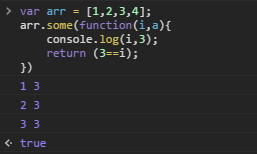
Then `if` on `actionCheck`. If it is true, `continue` skips the rest of this iteration and starts the next one.
OK, that filters the form's action. Next, filter inputs with a whitelist.
```js
for(var x = 0;x < formDom.find(":text").length;x++){
var inputTextCheck;
var inputText = formDom.find(":text").eq(x);
if(inputText.attr("placeholder") == undefined){
continue;
}
inputTextCheck = placeholderFilterKeyword.some(function(item,index){
return (inputText.attr("placeholder").toLowerCase().indexOf(item) != "-1");
})
if(inputTextCheck){
continue outerFor;
}
}
```
First use `(":text")` to iterate every `input` with `type` text under the current form.
`inputTextCheck` holds the boolean from `some`. `inputText` is the current input.
Then `if` whether the current input has a placeholder. If not, skip this iteration of the loop whose init variable is `x`. Do not continue downward; run the same steps on the next input. If placeholder exists and has a value, the `if` expression is false, so that `if` does not run, and we continue to:
```js
inputTextCheck = placeholderFilterKeyword.some(function(item,index){
return (inputText.attr("placeholder").toLowerCase().indexOf(item) != "-1");
})
if(inputTextCheck){
continue outerFor;
}
```
This is the same as the action check, so I will not repeat it.
## 0x03 Filter out forms with no submit button
***
Why this? Some forms are not for users. They have no submit button. They are invisible to the user, and they do not touch core operations, so we drop them. Code:
```js
if(formDom.find(":submit").length < 1){
continue;
}
```
This is simple, so I will not walk through it.
## 0x04 Filter out forms with a token
***
For CSRF, a form with a token can basically be treated as not vulnerable, excluding the case where the same page has both XSS and CSRF.
How do we find a token? `type` is hidden? `name` contains token? No. Those are not accurate enough to cut false positives and still keep coverage. What we do: check whether the value of a hidden input is longer than 10.
What is special about a token input:
>
> 1. type is hidden
> 2. For safety, a token is generally not shorter than 10 characters.
> 3. It is always sent to the backend as an input.
OK, iterate every hidden input under the current form, then check whether value length is greater than 10. If it is, this form is very likely token-protected and the program drops it. Skip this iteration of the loop whose init variable is `i`. In code:
```js
for(var j = 0;j < formDom.find(":hidden").length;j++){
if(formDom.find(":hidden").eq(j).val().length > 10){
continue outerFor;
}
}
```
The program is not complex. The idea is. So there is not much code here, and it is simple. I will not walk through it.
## 0x05 Filter out forms with a captcha
***
After writing the automated XSS detector, this part is clearer. Take the img `src`, and check whether the suffix is an image type. Code:
```js
if(formDom.find("img").length > 0){
var imageCheck;
for(var z = 0;z < formDom.find("img").length;z++){
var img = formDom.find("img").eq(z);
var imgSrc = img.attr("src")
if(!!imgSrc){
if(imgSrc.indexOf("?") != "-1"){
imgSrc = imgSrc.slice(0,imgSrc.indexOf("?"));
}
imgSrc = imgSrc.substr(imgSrc.lastIndexOf("."),imgSrc.length);
imageCheck = imageFileSuffix.some(function(item,index){
return (imgSrc == item);
})
if(!imageCheck){
continue outerFor;
}
}
}
}
```
First, `formDom.find("img").length` checks whether the current form has images. If it does, the `if` is true. Inside, a variable holds the boolean from `some`.
Then a for loop over img tags in the current form. `img` is the current img tag. `imgSrc` is its src.
Next, `if(!!imgSrc)`: this coerces `imgSrc` to a boolean. If the img has no src or an empty value, it is false. If src exists and has a value, it is true.
The next block strips everything after `?`:
```js
if(imgSrc.indexOf("?") != "-1"){
imgSrc = imgSrc.slice(0,imgSrc.indexOf("?"));
}
```
Why? To keep captcha images from being cached, people append a question mark and a random number so each refresh requests the image again.
`imgSrc = imgSrc.substr(imgSrc.lastIndexOf("."),imgSrc.length);` strips everything except the suffix. For example, an img like:
` `. After the code above, only `.php` is left.
The `some` below is the same as before. The only extra is `!` to negate. Previous checks were blacklists. This one is a whitelist, so we negate.
## 0x06 Other
The full code:
```js
outerFor:
for(var i = 0;i < $("form").length;i++){
var formDom = $("form").eq(i);
var imageFileSuffix = ['.jpg','.png','.jpge','.ico','.gif','.bmp'];
var placeholderFilterKeyword = ['跳','搜','查','找','登陆','注册','search'];
var actionFilterKeyword = ['search','find','login','reg'];
// remove useless forms such as search and page-jump forms
if(formDom.attr("action") != undefined){
var actionCheck = actionFilterKeyword.some(function(item,index){
return (formDom.attr("action").toLowerCase().indexOf(item) != "-1");
})
if(actionCheck){
continue;
}
}
for(var x = 0;x < formDom.find(":text").length;x++){
var inputTextCheck;
var inputText = formDom.find(":text").eq(x);
if(inputText.attr("placeholder") == undefined){
continue;
}
inputTextCheck = placeholderFilterKeyword.some(function(item,index){
return (inputText.attr("placeholder").toLowerCase().indexOf(item) != "-1");
})
if(inputTextCheck){
continue outerFor;
}
}
// remove forms without a submit button
if(formDom.find(":submit").length < 1){
continue;
}
// remove forms that contain a token
for(var j = 0;j < formDom.find(":hidden").length;j++){
if(formDom.find(":hidden").eq(j).val().length > 10){
continue outerFor;
}
}
// remove forms that contain a captcha
if(formDom.find("img").length > 0){
var imageCheck;
for(var z = 0;z < formDom.find("img").length;z++){
var img = formDom.find("img").eq(z);
var imgSrc = img.attr("src")
if(!!imgSrc){
if(imgSrc.indexOf("?") != "-1"){
imgSrc = imgSrc.slice(0,imgSrc.indexOf("?"));
}
imgSrc = imgSrc.substr(imgSrc.lastIndexOf("."),imgSrc.length);
imageCheck = imageFileSuffix.some(function(item,index){
return (imgSrc == item);
})
if(!imageCheck){
continue outerFor;
}
}
}
}
console.log(formDom)
}
```
`console.log(formDom)` can be changed to send a request with ajax, or `alert` that the page may have a CSRF issue. How you use it is up to you: pack it into a browser extension by hand. Here is the automated XSS extension I wrote earlier: [http://pan.baidu.com/s/1ge5VTcf](http://pan.baidu.com/s/1ge5VTcf). Unpack it, replace the JavaScript with the full code above, and pack it again.
This post still has many gaps. The program is only a prototype, so I did not attach a ready-to-use tool. First time I have done it this way. A lot is not covered, such as JSON Hijacking detection. The next chapter will finish that, and I will also release a tool you can use directly. Part 2 or 3 may combine the earlier XSS automation with this CSRF detection. XSS plus CSRF is much more dangerous.
`. After the code above, only `.php` is left.
The `some` below is the same as before. The only extra is `!` to negate. Previous checks were blacklists. This one is a whitelist, so we negate.
## 0x06 Other
The full code:
```js
outerFor:
for(var i = 0;i < $("form").length;i++){
var formDom = $("form").eq(i);
var imageFileSuffix = ['.jpg','.png','.jpge','.ico','.gif','.bmp'];
var placeholderFilterKeyword = ['跳','搜','查','找','登陆','注册','search'];
var actionFilterKeyword = ['search','find','login','reg'];
// remove useless forms such as search and page-jump forms
if(formDom.attr("action") != undefined){
var actionCheck = actionFilterKeyword.some(function(item,index){
return (formDom.attr("action").toLowerCase().indexOf(item) != "-1");
})
if(actionCheck){
continue;
}
}
for(var x = 0;x < formDom.find(":text").length;x++){
var inputTextCheck;
var inputText = formDom.find(":text").eq(x);
if(inputText.attr("placeholder") == undefined){
continue;
}
inputTextCheck = placeholderFilterKeyword.some(function(item,index){
return (inputText.attr("placeholder").toLowerCase().indexOf(item) != "-1");
})
if(inputTextCheck){
continue outerFor;
}
}
// remove forms without a submit button
if(formDom.find(":submit").length < 1){
continue;
}
// remove forms that contain a token
for(var j = 0;j < formDom.find(":hidden").length;j++){
if(formDom.find(":hidden").eq(j).val().length > 10){
continue outerFor;
}
}
// remove forms that contain a captcha
if(formDom.find("img").length > 0){
var imageCheck;
for(var z = 0;z < formDom.find("img").length;z++){
var img = formDom.find("img").eq(z);
var imgSrc = img.attr("src")
if(!!imgSrc){
if(imgSrc.indexOf("?") != "-1"){
imgSrc = imgSrc.slice(0,imgSrc.indexOf("?"));
}
imgSrc = imgSrc.substr(imgSrc.lastIndexOf("."),imgSrc.length);
imageCheck = imageFileSuffix.some(function(item,index){
return (imgSrc == item);
})
if(!imageCheck){
continue outerFor;
}
}
}
}
console.log(formDom)
}
```
`console.log(formDom)` can be changed to send a request with ajax, or `alert` that the page may have a CSRF issue. How you use it is up to you: pack it into a browser extension by hand. Here is the automated XSS extension I wrote earlier: [http://pan.baidu.com/s/1ge5VTcf](http://pan.baidu.com/s/1ge5VTcf). Unpack it, replace the JavaScript with the full code above, and pack it again.
This post still has many gaps. The program is only a prototype, so I did not attach a ready-to-use tool. First time I have done it this way. A lot is not covered, such as JSON Hijacking detection. The next chapter will finish that, and I will also release a tool you can use directly. Part 2 or 3 may combine the earlier XSS automation with this CSRF detection. XSS plus CSRF is much more dangerous.