
Company Wi-Fi security
0x0 Preface
A lot of companies have no security team. Ops owns all of security, so security takes a hit. I’ve been doing security assessments for various companies lately, so I’m writing down what I’ve learned. Feel free to fill in anything I missed.
0x1 Wireless security
A lot of companies don’t take wireless security seriously. Companies with money buy gear. Companies without throw people at it. However skilled the people are, without equipment, manpower alone doesn’t help much.
Most company Wi-Fi auth is basically WPA/WPA2 plus a web secondary authentication, and people think that’s enough. It isn’t. You can crack WPA with aircrack-ng, airmon-ng, airodump-ng, and aireplay-ng. For WPA2, dictionary brute force.
You can also spoof a Wi-Fi network with a Wi-Fi Pineapple. And everyone knows the “Wi-Fi Master Key” app: try that first, and only crack it if Master Key can’t. After you join the Wi-Fi, you’ll be told to do web secondary authentication. You can ignore that. It doesn’t do anything useful.
Because auth is WPA/WPA2, once you join the Wi-Fi the switch hands you an intranet IP right away (in my cases it was a switch; it could also be a router). Why would an attacker want your internet access? They want intranet resources.
Not being able to reach the internet is not a problem for an attacker. When I assessed one company, I cracked it with Master Key, then MITM sniffed. In under two minutes I had admin access to their company website backend.
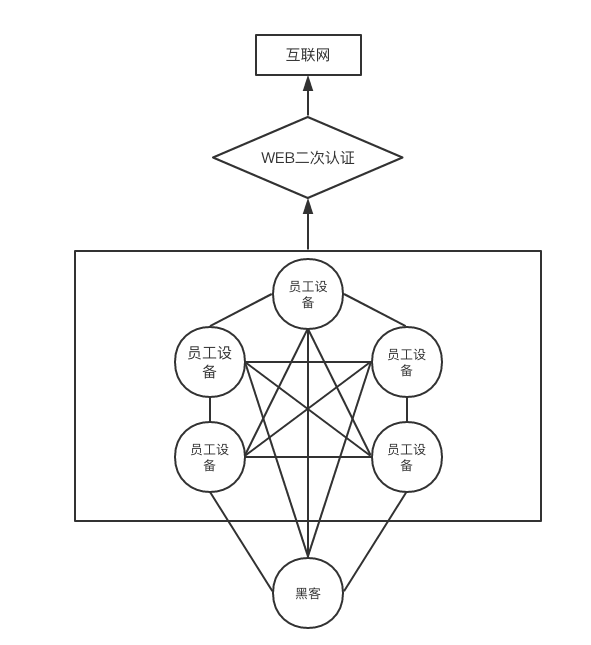
Web auth, as I see it, is not aimed at attackers. It’s aimed at employees. Attackers don’t need internet access. Employees do. Here’s a diagram I drew:
Mind map URL (opens in a new tab)
After the attacker joins the Wi-Fi, they still can’t pass web secondary authentication, but they are already on the intranet and can reach any internal resource.
Suggested fixes:
-
Replace WPA/WPA2 wireless auth with 802.1X (802.1X wireless auth needs switch support)
-
Buy wireless detection / defense gear
-
Wireless cannot reach intranet resources; only wired can (isolate the problem physically)
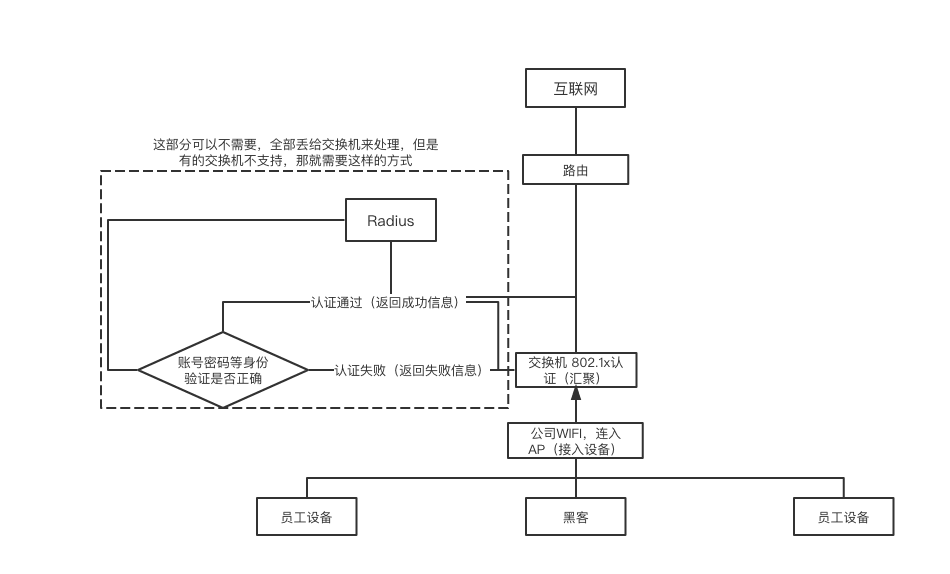
For 802.1X, the flow looks like this:
Mind map URL (opens in a new tab)
Even if the attacker joins the company Wi-Fi, they cannot pass 802.1X, so
company gear (routers, switches) will not grant an intranet IP or an external egress IP.
0x2 Deeper wireless security
What I covered above is only about managing the Wi-Fi the company itself exposes.
Of those three fixes, the first is the most convenient and doesn’t cost money (the network gear has to support 802.1X wireless; if it doesn’t, you still have to spend).
The second, companies that don’t want to spend won’t pick. And after you buy it you still have to configure it. The upfront work is huge.
The third is a lot of work: you have to re-architect the company network. A colleague and I started after we got off at 6pm and only finished just before the next workday.
If the company doesn’t want to spend, or ops doesn’t want to re-architect, the first option is a good choice. But there’s another problem: 360 / Baidu portable Wi-Fi. That thing makes already-insecure companies even worse.
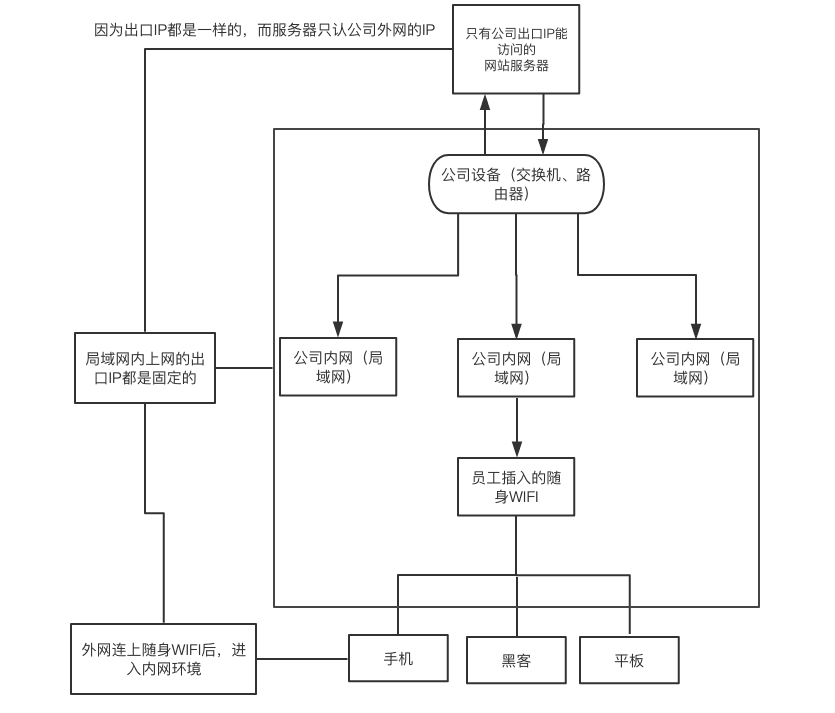
Once a 360 / Baidu portable Wi-Fi stick is plugged into a company PC, it starts the ICS (Internet Connection Sharing) service plus the wireless NIC’s AP mode. After you join that portable Wi-Fi, you’re on a small LAN. From there we can compromise the PC with the stick plugged in, then use it to move through the rest of the company. If you only need a particular kind of access, you don’t need to compromise that PC. Say you need this site’s admin backend, but logging in requires the egress IP to be the company’s public IP. In that case we don’t need to compromise the PC with the portable Wi-Fi. Why? I drew a diagram:
Mind map URL (opens in a new tab)
After the attacker joins this Wi-Fi, there is no web secondary authentication, because they’re using the employee’s network, and the employee has already authenticated. The employee is on the company intranet, the intranet has a single egress IP, and the server only allows that IP. Other IPs can’t reach the server.
There are plenty of fixes online. Look up a tutorial.
If you have a better solution, I’d like to hear it. My thinking is limited. Sorry for any gaps.
Reply to this post on X (opens in a new tab)View as Markdown