
Some thoughts on implementing image drag-and-drop and paste with vue-simplemde
Intro
The project uses Vue and needed a markdown editor. I looked on npm, found simplemde (opens in a new tab) was decent. I’m pretty lazy, so I searched npm again, found the vue-simplemde (opens in a new tab) package, and started using it.
But vue-simplemde does not support drag-and-drop image upload or paste upload. You can’t really blame vue-simplemde; it is only a Vue wrapper around simplemde. So it comes down to simplemde not shipping this. For UX this feature is necessary, unless you drop the markdown editor and switch to a rich-text one, in which case a lot of the project would have to change. I looked up articles and some GitHub code. Analysis below.
Drag and drop
The core of the drag-and-drop API is the drop event: it fires when you drag a file from the desktop into the browser and release.
We all know that if you drag an image into the browser, it just opens the image. That is the default: dragging a file into the browser opens the file. We need to block that native behavior.
First, a snippet that suppresses the default:
window.addEventListener("drop", e => { e = e || event if (e.target.className === 'CodeMirror-scroll') { // if it enters the editor, prevent the default event e.preventDefault() }}, false)CodeMirror-scroll is the class name of the simplemde editor.
Now if we drag a file onto the editor and release, nothing happens. Outside the editor, the default still fires.
Next, get the simplemde instance and attach a drop handler.
// assume the page has three editor windows, so we loop to bind listeners[ this.$refs.simplemde1,  this.$refs.simplemde2,  this.$refs.simplemde3].map(({simplemde}) => {  simplemde.codemirror.on('drop', (editor, e) => {    if (!(e.dataTransfer && e.dataTransfer.files)) {      // alert that this browser does not support this operation      return    }
    let dataList = e.dataTransfer.files    let imageFiles = [] // array of file instances to upload
    // loop because several image files may be dragged at once    for (let i = 0; i < dataList.length; i++) {    // if not an image, warn that only dragging image files is supported      if (dataList[i].type.indexOf('image') === -1) {        // the continue below means: if the user drags 2 images and one document at once, the document is not uploaded while the images are uploaded as usual.        continue      }      imageFiles.push(dataList[i])  // push the current file into the array first, then upload them all together after the for loop ends.    }    // uploadImagesFile is the method that uploads images    // simplemde.codemirror is used to tell which editor the current image upload belongs to    this.uploadImagesFile(simplemde.codemirror, imageFiles)    // because the code below already exists, the default-event blocking code above is unnecessary    e.preventDefault()  })})
At first glance it looks like a lot of code; that’s the comments. Here it is without comments. Read it and form your own take:
[ this.$refs.simplemde1, this.$refs.simplemde2, this.$refs.simplemde3].map(({simplemde}) => { simplemde.codemirror.on('drop', (editor, e) => { if (!(e.dataTransfer && e.dataTransfer.files)) { return } let dataList = e.dataTransfer.files let imageFiles = [] for (let i = 0; i < dataList.length; i++) { if (dataList[i].type.indexOf('image') === -1) { continue } imageFiles.push(dataList[i]) } this.uploadImagesFile(simplemde.codemirror, imageFiles) e.preventDefault() })})Paste
The paste API is the paste event. Unlike drop, paste does not need preventDefault. If you copy an image and press ctrl+v in the browser, nothing happens, so there is no need to block the default.
Code:
simplemde.codemirror.on('paste', (editor, e) => { // handler triggered when pasting an image if (!(e.clipboardData && e.clipboardData.items)) { // alert that this browser does not support this operation return } try { let dataList = e.clipboardData.items if (dataList[0].kind === 'file' && dataList[0].getAsFile().type.indexOf('image') !== -1) { this.uploadImagesFile(simplemde.codemirror, [dataList[0].getAsFile()]) } } catch (e) { // alert that only images can be pasted }})The try...catch is there because if you paste a file, items is empty, and the if below reads dataList[0].kind, i.e. e.clipboardData.items[0].kind. Accessing kind on a missing item throws. So we need try...catch.
dataList[0].getAsFile().type.indexOf('image') !== -1 checks that what you pasted is actually an image, not something else.
The upload call inside if differs in [dataList[0].getAsFile()]. I wrap it in [] so the shape matches what uploadImagesFile expects. dataList[0].getAsFile() is the file instance.
Upload
Upload is a bit more of a hassle:
uploadImagesFile (simplemde, files) { // wrap each file instance with FormData and return an array let params = files.map(file => { let param = new FormData() param.append('file', file, file.name) return param })
let makeRequest = params => { return this.$http.post('/Api/upload', params) } let requests = params.map(makeRequest)
this.$http.spread = callback => { return arr => { return callback.apply(null, arr) } }
// the server returns the format {state: Boolean, data: String} // when state is false, data is the returned error message // when state is true, data is the uploaded image's url, an absolute path relative to the site, like below: // /static/upload/2cfd6a50-3d30-11e8-b351-0d25ce9162a3.png Promise.all(requests) .then(this.$http.spread((...resps) => { for (let i = 0; i < resps.length; i++) { let {state, data} = resps[i].data if (!state) { // alert showing the error message in data continue } let url = `` // assemble into markdown syntax let content = simplemde.getValue() simplemde.setValue(content + url + '\n') // concatenate with the editor's existing content } }))}I wrapped axios as a Vue plugin, so this.$http is the instance, not axios itself.
The axios maintainers’ fix is to import the axios package again. I don’t think that is needed. Internally axios.all is Promise.all. axios.spread is small, so I copied it and assigned it back onto axios.
So the snippet above is
Promise.all(requests) .then(this.$http.spread((...resps) => { // code })Which is equivalent to
axios.all(requests) .then(axios.spread((...resps) => { // code })For this, see the official thread: axios-all-is-not-a-function-inside-vue-component (opens in a new tab). You can also look at the axios source: axios.js#L45-L48 (opens in a new tab)
I won’t go further on this. Back to the topic.
When state is true, data is an absolute path on the site, e.g. /static/upload/2cfd6a50-3d30-11e8-b351-0d25ce9162a3.png
We need to concatenate, hence . The last two lines get the previous content and append the url.
Wrap-up
Here is the final result:
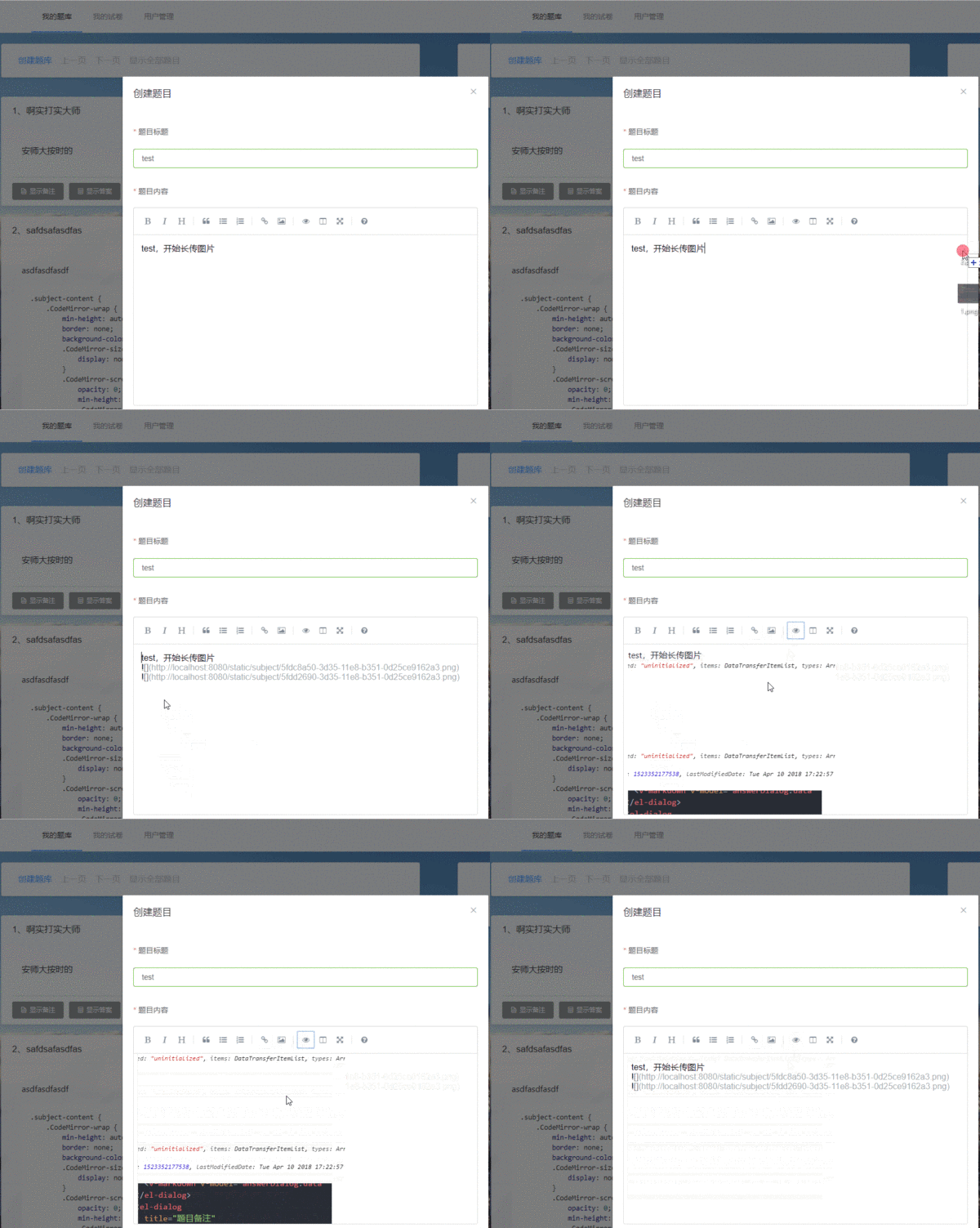
Full code: Subject.vue#L378-L465 (opens in a new tab)
References && thanks
code from skecozo’s laravel-demo (opens in a new tab)
Reply to this post on X (opens in a new tab)View as Markdown