---
title: "Web security overview"
description: "Common web attacks and how they work (XSS, CSRF, SSRF, JSON hijacking), plus Docker labs so you can try them"
date: 2019-10-17
tags: ["web","xss","csrf","ssrf","json hijacking"]
lang: en
url: https://bugs.cc/posts/web-security-overview/
translation: https://bugs.cc/zh/posts/web-security-overview/
---
# Web security overview
## Preface
A look at web attacks and how they work, including frontend, backend, and ops.
The backend examples use PHP. After comparing options, PHP is the most obvious language for showing this.
Every attack in this post has a Docker lab so you can research and test it yourself.
This post is a partial recap of my older security writeups, with some cleanup and additions. If you want more, see [Freebuf Black-Hole](https://www.freebuf.com/author/Black-Hole).
## Frontend
### XSS
XSS is executing your JavaScript in someone else's browser. Everything else is supporting technique.
#### DOM XSS
Abuse JavaScript's ability to mutate the DOM.
Where it shows up: separated frontend/backend architectures.
Most developers know not to use `eval` unless they have to. One reason is security. Does skipping `eval` mean you are safe? No.
Look at this:
```html
```
To make this clearer, a short walkthrough:
> Suppose the current URL is `http://baidu.com/#http://360.cn`. Then `location.hash.slice(1)` is `http://360.cn`.
>
> `new URL(url).href` parses the URL and returns the parsed href. If the URL fails its internal checks, it throws.
Looks fine, right? `new URL()` is a built-in. It is supposed to filter for us.
So we break that check. The table below is from the `URL` spec [examples](https://url.spec.whatwg.org/#example-url-parsing):
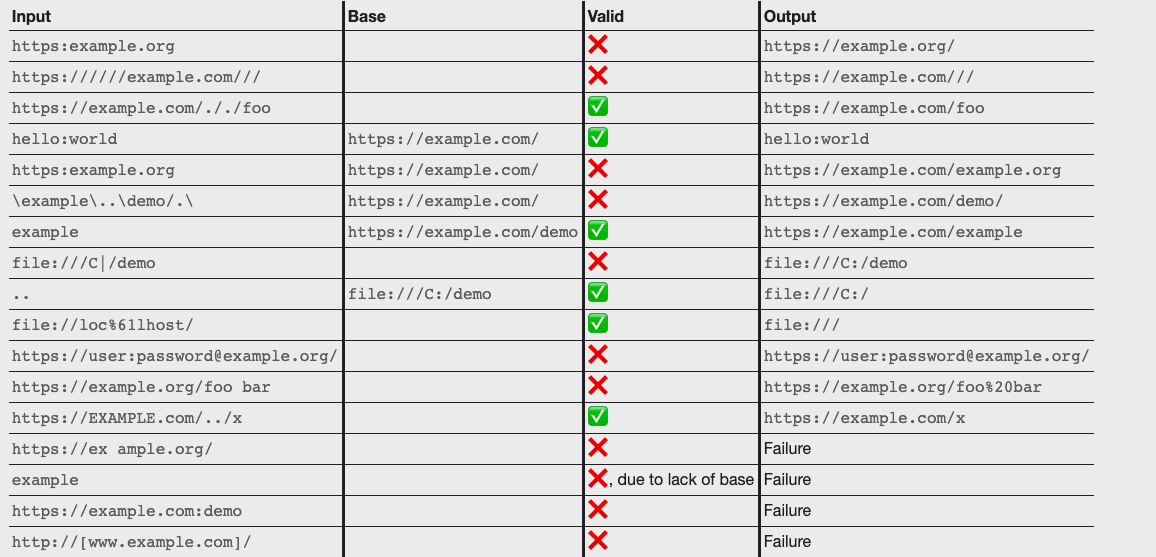
`hello:world` is valid. And `hello:` is a JavaScript label, similar to `goto` in C. Change the URL to `http://baidu.com/#javascript:alert(1)` and the bug fires.
[Docker lab](https://github.com/alo7/web-security-docker/tree/master/front-end/XSS/DOM-XSS)
## Backend
### Reflected XSS
Caused by missing or mismatched filtering on the frontend or backend.[^reflected-dom]
Where it shows up: MVC.
In MVC, frontend markup is written in the backend language. On a request, the backend builds the page, then returns the HTML to the browser. If XSS happens in that path, the backend is in the loop, so we usually call it reflected XSS.
PHP:
```php
I am a little square";
?>
```
It reads `bg` from the query string and uses it as a background color. Looks fine at first. `$bg` is attacker-controlled. Close the attribute and you are in:
`http://127.0.0.1:8082/?bg=123' onclick='alert(1)`
Put that in `bg` and the markup becomes:
\
I am a little square\<\/div\>
[Docker lab](https://github.com/alo7/web-security-docker/tree/master/back-end/XSS/non-persistent)
### Stored XSS
Reflected XSS, plus a write to the database.
The code:
```php
// get the client's IP address
// this code is from: https://stackoverflow.com/questions/3003145/how-to-get-the-client-ip-address-in-php
$ipaddress = 'UNKNOWN';
$keys = array('HTTP_CLIENT_IP', 'HTTP_X_FORWARDED_FOR', 'REMOTE_ADDR');
foreach($keys as $k) {
if (isset($_SERVER[$k]) && !empty($_SERVER[$k])) {
$ipaddress = $_SERVER[$k];
break;
}
}
// get the content and encode/filter it
$content = htmlspecialchars($_POST['content'], ENT_QUOTES);
$sql = "INSERT INTO xss.message (content, ip) VALUES ('$content', '$ipaddress')";
$conn->query($sql);
```
Looks fine. We already encode-filter `content`.[^htmlspecialchars]
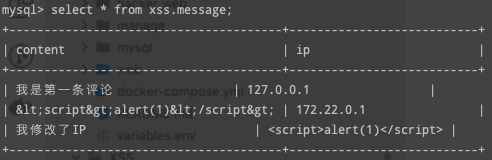
Even if we submit HTML, it is escaped. Submit `` and the database stores `<script>alert(1)</script>`
No way around it? There is.
The code also stores the client IP. That is the bug. `CLIENT-IP` and `X_FORWARDED_FOR` are user-controlled. Install the [ModHeader](https://bewisse.com/modheader/) extension:
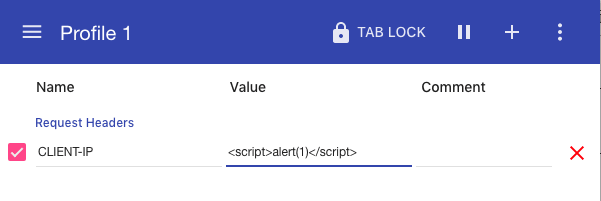
Change the header, submit again, and it is stored unescaped:
[Docker lab](https://github.com/alo7/web-security-docker/tree/master/back-end/XSS/persistent)
### CSRF
Think of CSRF as making someone else do the killing. It usually shows up in form submissions. Open-source projects, especially CMS software, are common.
```html
```
The form lives in the admin backend and adds an admin account. `addAdminUser.php` checks the current user's cookies. Non-admins cannot add anyone.
The form has no captcha and no token, and `addAdminUser.php` does not check `Referer`.
That is a CSRF bug.
When the browser requests a resource, it attaches unexpired cookies. So a request to add an admin from another site still carries the logged-in cookies. The server treats it as you (the cookie check passed).
Why CORS does not help: this kind of request cannot read the response, so CORS does not block it. An Ajax request would be blocked, because Ajax can read the response.
Besides `form`, what else works? The W3C CORS spec says:
> A [simple cross-origin request](https://www.w3.org/TR/cors/#simple-cross-origin-request) has been defined as congruent with those which may be generated by currently deployed user agents that do not conform to this specification. Simple cross-origin requests generated outside this specification (such as cross-origin form submissions using `GET` or `POST` or cross-origin `GET` requests resulting from `script` elements) typically include [user credentials](https://www.w3.org/TR/cors/#user-credentials), so resources conforming to this specification must always be prepared to expect simple cross-origin requests with credentials.
>
> ----See [w3c cors](https://www.w3.org/TR/cors/#security) for details.
That is a bit vague, so here is the extra: form submissions with `GET` or `POST`, and `GET` requests caused by HTML tags such as `a` and `img`, almost always carry user credentials (cookies).
[Docker lab](https://github.com/alo7/web-security-docker/tree/master/back-end/CSRF)
### SSRF
SSRF is not far from CSRF. CSRF targets the user on the client. SSRF targets the server itself.
It usually shows up in features that fetch and return a user-controlled resource.
Examples: view page source online, fetch the title of a user-supplied link, translate a page online.
```php
".htmlspecialchars($websiteCode, ENT_QUOTES)."";
?>
```
There is no filtering of user input. You can pass `http://192.168.1.2` and reach an internal host. The fetch runs on the server, and the server can reach other machines on the same LAN.
[Docker lab](https://github.com/alo7/web-security-docker/tree/master/back-end/SSRF/)
### JSON hijacking
JSON hijacking is the same idea as CSRF.[^json-hijacking-principle]
The main difference from CSRF is that JSON hijacking also abuses JSONP.
```php
```
```html
```
If an attacker hosts a page that also includes ``
Per the W3C CORS spec above, if the user is already logged in and then opens the attacker's link, the attacker can read sensitive data they should not have.
[Docker lab](https://github.com/alo7/web-security-docker/tree/master/back-end/JSON%20Hijacking)
[^reflected-dom]: DOM XSS is a kind of reflected XSS. People usually just say reflected XSS, and only split them when they need a finer cut.
[^htmlspecialchars]: `htmlspecialchars(string,ENT_QUOTES)` encodes like this: `&` becomes `&`, `"` becomes `"`, `'` becomes `'`, `<` becomes `<`, `>` becomes `>`.
[^json-hijacking-principle]: Same in the sense that the bug is born the same way: requests from tags still carry user credentials.