
Automated CSRF detection (part 2)
0x00 Intro
The previous post only sketched the idea and the flow. This one goes into how to actually detect CSRF. Why no extension in the last post? False positives were high, and it could not detect Referer checks. This chapter focuses on “how to detect whether the other side checks Referer”. As far as I know, this is the first tool that detects Referer checks (shameless grin). Today I found that Tencent already shipped a similar product (opens in a new tab) in 2013 (awkward…), but the approach and implementation are different. This chapter is Referer detection. Part 3 will strengthen token detection, aiming for 80-90%+ success (I actually forgot to write that while writing part 2, so it got pushed to part 3…). And Tencent’s product does not have these.
0x01 A few small changes
The previous black/white lists:
var placeholderFilterKeyword = ['跳','搜','查','找','登陆','注册','search']; // useless-form blacklist, used to check whether this form is useful (input-based check); these keywords match Chinese form placeholder textvar actionFilterKeyword = ['search','find','login','reg']; // useless-form blacklist, used to check whether this form is useful (form-action-based check)}The current black/white lists:
var placeholderFilterKeyword = ['跳','搜','查','找','登陆','注册','search'];var actionFilterKeyword = ['search','find','login','reg',"baidu.com","google.com","so.com","bing.com","soso.com","sogou.com"];This code largely decides the extension’s false-positive rate. You can change it until it feels right.
New init variables:
var actionCache,actionPath;var actionvParameter = "";var ajaxParameter = "";0x02 Extension layout
Maxthon’s APIs are too thin. Without those APIs I cannot do Referer detection, so I am not writing a Maxthon version of the CSRF extension. Chrome extension layout:
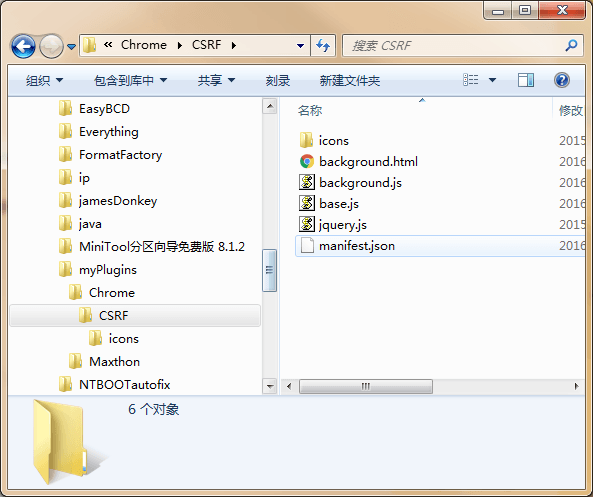
icons holds the extension icons. I am lazy, so I reused the AutoFindXSS icons.
background.html lets us change the extension’s scope so we control it, and can use the
jqueryplugin from Chrome APIs.
background.js is the “backend”, like a server. It handles data from
base.js.
base.js runs after the site loads. For Referer detection, it sends data to
background.js.
manifest.json is the core Chrome extension file. It configures the extension.
manifest.json:
{ "background": { "page": "background.html", "persistent": true }, "name": "AutoFindCSRF", "version": "1.0.0", "manifest_version": 2, "description": "CSRF[by:Black-Hole&158099591@qq.com]", "content_security_policy": "script-src 'self' 'unsafe-eval'; object-src 'self'", "permissions": [ "<all_urls>","tabs" ], "icons":{"16": "icons/icon_16.png","48": "icons/icon_48.png","128": "icons/icon_128.png"}, "content_scripts": [{ "matches": ["*://*/*"], "js": ["jquery.js","base.js"], "run_at": "document_end" }]}content_security_policy, CSP for short, restricts extension security.
permissions is what the extension asks Chrome for.
content_scripts means that on any scheme, after the page loads, jquery.js and base.js run. JavaScript
thispoints at the current page.
background: JavaScript
thispoints at the extension. It handles communication between base.js and background.js.
The JavaScript from the previous post (opens in a new tab) all lives in base.js. The Referer check below is also written in that file.
0x03 Detect whether the target checks Referer
To keep the code below shorter, first assign the current form’s action to a variable:
actionCache = formDom.attr("action");
Then match the action URL. Why? Because action can look like any of these:
#test
./test.php && ./test(handled the same way)
/test.php?a=11
test.php
We match with switch:
switch(actionCache[0]){ case "#": actionPath = location.href + actionCache; break; case "/": actionPath = location.origin + actionCache; break; case ".": if(actionCache.indexOf("?") != "-1"){ actionvParameter = "?" + actionCache.split("?")[1]; actionCache = actionCache.slice(0,actionCache.indexOf("?")); } if(location.href.split("/").pop().split(".").length == 1){ actionPath = location.href + actionCache.substr(1,actionCache.length-1) + actionvParameter; }else{ actionPath = location.href.substr(location.href,location.href.lastIndexOf(location.href.split("/").pop())) + actionCache.substring(1,actionCache.length) + actionvParameter; } break; default: if(location.protocol == "http:" || location.protocol == "https:"){ actionPath = location.href; break; } if(location.href.split("/").pop().split(".").length == 1){ actionPath = location.href + "/" + actionCache; }else{ actionPath = location.href.substr(location.href,location.href.lastIndexOf(location.href.split("/").pop())) + actionCache; } break;}When the first character of action is #, concatenate with location.href + actionCache;.
When the first character of action is /, concatenate with location.origin + actionCache;.
When the first character of action is .:
First use indexOf to copy the query into a variable and strip it:
if(actionCache.indexOf("?") != "-1"){ actionvParameter = "?" + actionCache.split("?")[1]; actionCache = actionCache.slice(0,actionCache.indexOf("?"));}Details:
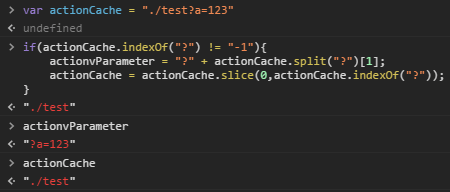
Then branch on whether the current URL has a suffix:
if(location.href.split("/").pop().split(".").length == 1){ actionPath = location.href + actionCache.substr(1,actionCache.length-1) + actionvParameter;}else{ actionPath = location.href.substr(location.href,location.href.lastIndexOf(location.href.split("/").pop())) + actionCache.substring(1,actionCache.length) + actionvParameter;}location.href.split("/").pop().split(".").length checks whether the current URL has a suffix. With a suffix the length is 2. Without a suffix it is 1. If there is no query, nothing extra is appended, because the init variable is already an empty string. Details:

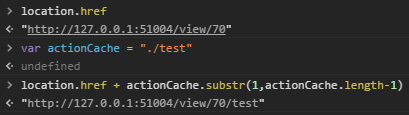
Besides those, action can be a bare filename or a full URL. I put that on the switch default branch, because actionCache[0] cannot match it:
default: if(location.protocol == "http:" || location.protocol == "https:"){ actionPath = location.href; break; } if(location.href.split("/").pop().split(".").length == 1){ actionPath = location.href + "/" + actionCache; }else{ actionPath = location.href.substr(location.href,location.href.lastIndexOf(location.href.split("/").pop())) + actionCache; } break;First check whether location.protocol is http or https. If so, use location.href;. If it is not http:// or https://, skip this if. Then check whether the URL has a suffix. If it does not, run: actionPath = location.href + "/" + actionCache;, as shown:
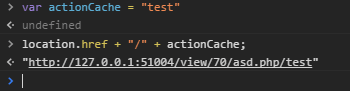
When there is a suffix, run: actionPath = location.href.substr(location.href,location.href.lastIndexOf(location.href.split("/").pop())) + actionCache;. As shown:

0x04 Simulate form parameters
Code:
for(var v = 0;v < formDom.find(":text").length;v++){ var input = formDom.find(":text").eq(v); if(input.attr("name") != ""){ if(input.val() == ""){ ajaxParameter += input.attr("name") + "=" + "15874583485&"; }else{ ajaxParameter += input.attr("name") + "=" + input.val() + "&"; } }else{ continue; }}ajaxParameter = ajaxParameter.substring(0,ajaxParameter.length-1);The for loop walks input tags with type text under the current form, then var input = formDom.find(":text").eq(v); assigns the current input to input.
Then if whether the current input has a name. If not, continue; skips this iteration of the loop whose init variable is v. If it does, check whether the input’s value is non-empty. If it is, append it to ajaxParameter: ajaxParameter += input.attr("name") + "=" + input.val() + "&";. If not, append 15874583485 to ajaxParameter. Why something that looks like a phone number? High tolerance. Each assignment also appends &, which is convenient for the ajax request below. The last & still needs to be stripped, hence: ajaxParameter = ajaxParameter.substring(0,ajaxParameter.length-1);.
0x04 Talk to the extension’s background.js
The Referer-detection idea: send one ajax request from the current site. Referer is the current URL, which is normal, same as submitting the form. Then pass the action URL, method, and parameters to the extension, and send another AJAX from the extension. When a Chrome extension sends AJAX, Referer is empty. Two submissions: if Referer is checked, the response lengths will differ; if not, the lengths will be the same (there can be small differences, for example a clock on the page, so the lengths differ even without a Referer check; we add some tolerance below).
Chrome gives extensions chrome.runtime.sendMessage to send and chrome.runtime.onMessage.addListener to receive.
First, the chrome.runtime.sendMessage call in base.js:
$.ajax({ url: actionPath, type: (formDom.attr("method") == undefined) || (formDom.attr("method") == 'get')?'get':'post', dataType: 'html', data: (formDom.attr("method") == undefined) || (formDom.attr("method") == 'get')?'':ajaxParameter, async: false,}).done(function(data){ var firstAjax = data.length; var formCache = formDom; chrome.runtime.sendMessage({action: actionPath, parameter: (formDom.attr("method") == undefined) || (formDom.attr("method") == 'get')?'':ajaxParameter},function (response) { if(Math.abs(firstAjax - response.status) < 10){ formCache.attr("style","border: 1px red solid;") } });})A form’s method is not fixed, so ajax type is set with: (formDom.attr("method") == undefined) || (formDom.attr("method") == 'get')?'get':'post', a ternary. When method is missing or get, type is get. When it is present (and not get), type is post.
The data option is the same idea, except there is no get/post choice, only '':ajaxParameter. When method is get, parameters already live on actionPath. When it is post, pass the concatenated parameters as data. Then measure the response length: var firstAjax = data.length;. Why assign the form to another variable below? I am not sure. The Chrome API’s scope may be different, so using formDom there gave the wrong result. Assigning to formCache made the API behave.
Then the Chrome API:
chrome.runtime.sendMessage({action: actionPath, parameter: (formDom.attr("method") == undefined) || (formDom.attr("method") == 'get')?'':ajaxParameter},function (response) { if(Math.abs(firstAjax - response.status) < 10){ formCache.attr("style","border: 1px red solid;") } });action and parameter are the payload. (formDom.attr("method") == undefined) || (formDom.attr("method") == 'get')?'':ajaxParameter is the same as above: no parameter on get, ajaxParameter on post. response is the callback, like ajax done, with the result from background.js.
How background.js handles it:
chrome.runtime.onMessage.addListener(function(message,sender,sendResponse){ $.ajax({ url: message.action, type: (message.parameter == "")?'get':'post', dataType: 'html', data: (message.parameter == "")?'':message.parameter, async: false, }) .done(function(data) { sendResponse({status: data.length}) })})chrome.runtime.onMessage.addListener is the receive function, then AJAX. In done, sendResponse({status: data.length}) returns the length of the extension’s AJAX response. base.js then gets that result from background.js, and we are back to:
if(Math.abs(firstAjax - response.status) < 10){ formCache.attr("style","border: 1px red solid;")}Math.abs is absolute value. When the length difference of the two ajax responses is less than 10, there is no Referer check. When it is greater than 10, there is a Referer check. 10 is the tolerance.
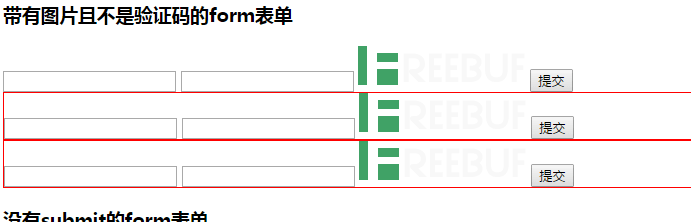
When a CSRF issue exists, the form gets a red border:
Reply to this post on X (opens in a new tab)View as Markdown