自动化检测 CSRF(第二篇)
0x00 前言:
上一篇只是大致说明整个思路和流程。本篇就详细说说如何检测 CSRF。为什么不在上一篇中放出插件呢。是因为误报率确实是比较多,而且无法检测 Referer。而本章,重点就说明“如何检测对方是否开启了 Referer 检测机制”。在我的认知范围内,这是首款检测 Referer 的工具 (不知廉耻的笑了)。今天发现腾讯在 2013 年就做了类似的产品 (在新标签页打开) (这就尴尬了..),不过还好。而且思路和实现方法有所区别。本章说检测 Referer,第三章说检测 token 机制的强化,让检测 token 的成功率达到 80~90%以上 (其实就是写第二篇的时候,忘记写了。推到第三章了….)。而且这些是腾讯产品所没有的撒。
0x01 一些小的变化:
之前的黑白名单列表
var placeholderFilterKeyword = ['跳','搜','查','找','登陆','注册','search']; //无用表单黑名单,用于验证这个 form 表单有没有用(针对 input 验证)var actionFilterKeyword = ['search','find','login','reg']; //无用表单黑名单,用于验证这个 form 表单有没有用(针对 form 表单验证)}现在的黑白名单列表:
var placeholderFilterKeyword = ['跳','搜','查','找','登陆','注册','search'];var actionFilterKeyword = ['search','find','login','reg',"baidu.com","google.com","so.com","bing.com","soso.com","sogou.com"];此处的代码,决定了整体插件检测时的误报率大体走向。你也可以自己修改来达到自我感觉不错的地步。
现在的初始化变量:
var actionCache,actionPath;var actionvParameter = "";var ajaxParameter = "";0x02: 插件的整体框架
因为 Maxthon 浏览器的 API 实在是太少,没有这些 API 我无法进行 Referer 检测,于是,检测 CSRF 插件,就不写 Maxthon 的插件了,下面是 Chrome 插件的框架:
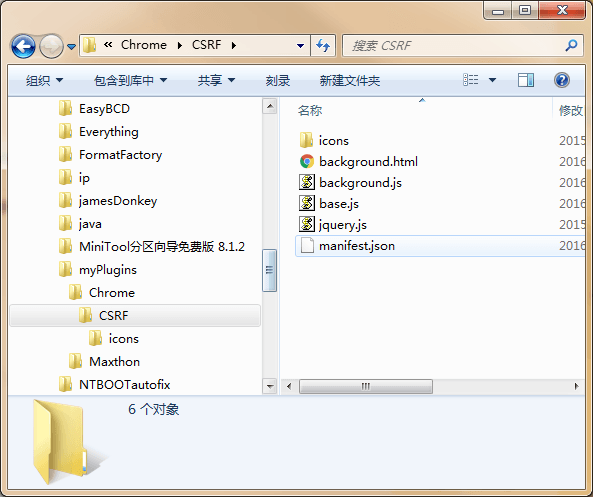
icons 是存放插件图标的地方,我比较懒,直接使用 AutoFindXSS 插件的图标。
background.html 是为了让我们修改插件的作用域,让我们可控,可以在 Chrome 的 API 中使用
jquery插件
background.js 这里我们把它理解为后端程序,类似于服务端的存在。用于处理
base.js文件的数据
base.js 会在网站加载完成后调用。在
检测Referer的时候,把数据传给background.js文件
manifest.json Chrome 插件的核心文件,用于配置插件参数。
这里我先给大家看一下 manifest.json 文件的内容:
{ "background": { "page": "background.html", "persistent": true }, "name": "AutoFindCSRF", "version": "1.0.0", "manifest_version": 2, "description": "CSRF[by:Black-Hole&158099591@qq.com]", "content_security_policy": "script-src 'self' 'unsafe-eval'; object-src 'self'", "permissions": [ "<all_urls>","tabs" ], "icons":{"16": "icons/icon_16.png","48": "icons/icon_48.png","128": "icons/icon_128.png"}, "content_scripts": [{ "matches": ["*://*/*"], "js": ["jquery.js","base.js"], "run_at": "document_end" }]}content_security_policy 简称 CSP,用户限制插件的安全性
permissions 是插件向 Chrome 申请的权限。
content_scripts 意思是,在任何协议下,当网站加载完成后,都会运行 jquery.js 和 base.js 文件。JavaScript this 指向的是当前网页
background JavaScript this 指向的是插件,用户处理 base.js 和 background.js 通信的存在
而上一篇文章 (在新标签页打开)的 JavaScript 代码,都存放在 base.js 里,待会说“检测 Referer 机制”时,也是写在这个文件里。
0x03: 检测对方是否开启了 Referer 检测机制
首先为了下面程序的简洁,先把当前表单的 action 地址赋值给一个变量:
actionCache = formDom.attr("action");
然后匹配 action 地址。为什么要匹配 action 地址呢,因为 action 分为以下几种情况:
#test
./test.php && ./test(处理方式一样)
/test.php?a=11
test.php
这里我们使用 switch 来实现匹配,代码如下:
switch(actionCache[0]){ case "#": actionPath = location.href + actionCache; break; case "/": actionPath = location.origin + actionCache; break; case ".": if(actionCache.indexOf("?") != "-1"){ actionvParameter = "?" + actionCache.split("?")[1]; actionCache = actionCache.slice(0,actionCache.indexOf("?")); } if(location.href.split("/").pop().split(".").length == 1){ actionPath = location.href + actionCache.substr(1,actionCache.length-1) + actionvParameter; }else{ actionPath = location.href.substr(location.href,location.href.lastIndexOf(location.href.split("/").pop())) + actionCache.substring(1,actionCache.length) + actionvParameter; } break; default: if(location.protocol == "http:" || location.protocol == "https:"){ actionPath = location.href; break; } if(location.href.split("/").pop().split(".").length == 1){ actionPath = location.href + "/" + actionCache; }else{ actionPath = location.href.substr(location.href,location.href.lastIndexOf(location.href.split("/").pop())) + actionCache; } break;}当 action 地址的第一个值是#时,直接使用 location.href + actionCache; 拼接。
当 action 地址的第一个值是/时,使用 location.origin + actionCache; 来进行拼接
当 action 地址的第一个值是.时:
先使用 indexOf 函数来把参数赋值给一个变量并去除,
if(actionCache.indexOf("?") != "-1"){ actionvParameter = "?" + actionCache.split("?")[1]; actionCache = actionCache.slice(0,actionCache.indexOf("?"));}详细的情况如下:
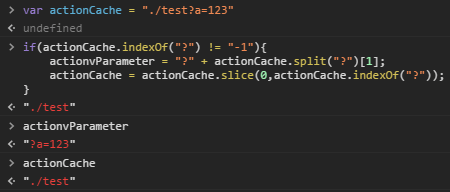
然后根据有无后缀进行匹配:
if(location.href.split("/").pop().split(".").length == 1){ actionPath = location.href + actionCache.substr(1,actionCache.length-1) + actionvParameter;}else{ actionPath = location.href.substr(location.href,location.href.lastIndexOf(location.href.split("/").pop())) + actionCache.substring(1,actionCache.length) + actionvParameter;}location.href.split("/").pop().split(".").length 是检测 当前url 有无后缀,如果有那么长度是为 2。如果没有后缀长度是 1。如果没有参数,将不会加任何字符串,因为在初始变量的时候就已经设为空了。详情如下:

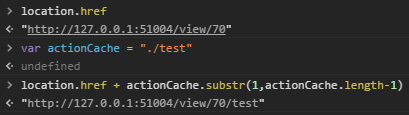
除去这些之外,还有直接是文件名或者直接是 url,这里呢,我直接写到 switch 的 default 分之上去了,因为无法使用 actionCache[0] 来匹配,代码如下:
default: if(location.protocol == "http:" || location.protocol == "https:"){ actionPath = location.href; break; } if(location.href.split("/").pop().split(".").length == 1){ actionPath = location.href + "/" + actionCache; }else{ actionPath = location.href.substr(location.href,location.href.lastIndexOf(location.href.split("/").pop())) + actionCache; } break;首先是判断 location.protocol 是否为 http 或 https 协议。如果是的话,直接使用 location.href;。当不为 http:// 或者 https:// 的时候,跳过此 if 判断。接下来就是判断 url 的后缀存在。如果存在将运行: actionPath = location.href + "/" + actionCache;,反馈如图:
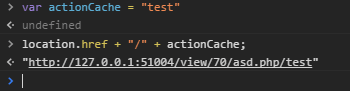
当存在后缀时,运行: actionPath = location.href.substr(location.href,location.href.lastIndexOf(location.href.split("/").pop())) + actionCache;。反馈如图:

0x04: 模拟 form 的参数
代码如下:
for(var v = 0;v < formDom.find(":text").length;v++){ var input = formDom.find(":text").eq(v); if(input.attr("name") != ""){ if(input.val() == ""){ ajaxParameter += input.attr("name") + "=" + "15874583485&"; }else{ ajaxParameter += input.attr("name") + "=" + input.val() + "&"; } }else{ continue; }}ajaxParameter = ajaxParameter.substring(0,ajaxParameter.length-1);使用 for 循环对当前 form 表单下属性为 text 的 input 标签,然后使用 var input = formDom.find(":text").eq(v); 来进行赋值,把当前的 input 赋值给 input 变量。
再使用 if 判断,当前的 input 标签是否存在 name 属性,如果没有,则使用 continue; 跳出初始化表达式变量为 v 的本次循环。如果存在,再判断当前的 input 的 value 属性里是否有值,如果有值则直接赋值给 ajaxParameter。代码: ajaxParameter += input.attr("name") + "=" + input.val() + "&";,如果不存在则把 15874583485 赋值给 ajaxParameter 变量,为什么要使用类似于手机号码的呢,因为容错率挺高的。可以看到我在每次赋值的时候,都会在后面加上&字符。因为方便下面发送 ajax。当然需要去掉最后一个&。于是乎,有了下面的代码: ajaxParameter = ajaxParameter.substring(0,ajaxParameter.length-1);。
0x04: 与插件的 background.js 进行通信
这里呢,我先说说“检测 Referer 的思路”,在当前网站发送一次 ajax 请求,Referer 的地址肯定是当前的 URL,是正常的,和普通提交 form 表单是一样的,这里呢,把 action 地址和 method 值及参数传给插件,在插件里再发送一次 AJAX 请求,chrome 插件发送 AJAX 时,Refere 是为空的。两次提交,如果存在 Referer 检测,那么返回的结果长度肯定是不一样的,如果不存在 Referer 检测,长度是一样的(当然可能存在个别的差异,因为可能要显示时间等,结果长度不一样,但是是不存在“Referer 检测”的,下面会增加容错率)
Chrome 对插件通信提供了发送 chrome.runtime.sendMessage 和接受 chrome.runtime.onMessage.addListener 的 API。
首先让我们来看看 base.js 文件里的发送 chrome.runtime.sendMessageAPI 代码:
$.ajax({ url: actionPath, type: (formDom.attr("method") == undefined) || (formDom.attr("method") == 'get')?'get':'post', dataType: 'html', data: (formDom.attr("method") == undefined) || (formDom.attr("method") == 'get')?'':ajaxParameter, async: false,}).done(function(data){ var firstAjax = data.length; var formCache = formDom; chrome.runtime.sendMessage({action: actionPath, parameter: (formDom.attr("method") == undefined) || (formDom.attr("method") == 'get')?'':ajaxParameter},function (response) { if(Math.abs(firstAjax - response.status) < 10){ formCache.attr("style","border: 1px red solid;") } });})因为 form 的 method 属性的值是不确定的。所以就需要对 ajax 的参数 type 进行设置: (formDom.attr("method") == undefined) || (formDom.attr("method") == 'get')?'get':'post',这里使用了三目运算符。当 method 的值不存在、为 get 的时候,type 为 get。当存在的时候,则为 post。
下面的 data 参数同理。只不过没有了 get、post 选项。改为 '':ajaxParameter。因为 method 值为 get 时,参数是附在 actionPath 变量里的。当为 post 的时候,将把之前拼接的参数传给 data 参数。这里计算一下返回页面的长度 var firstAjax = data.length;,至于下面的为什么要给变量再赋值一次呢,我也不知道,可能下面的 Chrome API 的作用域不同,导致在下面使用 API 的时候,使用 formDom 变量,结果不对。只能重新赋值给 formCache 变量,这个时候 API 才算正常。
下面就是 Chrome 的 API 了:
chrome.runtime.sendMessage({action: actionPath, parameter: (formDom.attr("method") == undefined) || (formDom.attr("method") == 'get')?'':ajaxParameter},function (response) { if(Math.abs(firstAjax - response.status) < 10){ formCache.attr("style","border: 1px red solid;") } });这里的 action 和 parameter 是发送的参数及值。至于代码 (formDom.attr("method") == undefined) || (formDom.attr("method") == 'get')?'':ajaxParameter 和上面同理,当为 get 的时候,不给 parameter 值,当为 post 的时候,值为 ajaxParameter。response 为回调函数,类似 ajax 的 done 函数,返回 background.js 的处理结果。
那 background.js 是如何处理的呢:
chrome.runtime.onMessage.addListener(function(message,sender,sendResponse){ $.ajax({ url: message.action, type: (message.parameter == "")?'get':'post', dataType: 'html', data: (message.parameter == "")?'':message.parameter, async: false, }) .done(function(data) { sendResponse({status: data.length}) })})chrome.runtime.onMessage.addListener 是接受函数,然后就是 AJAX 了,在 done 函数里,有一个 API 是 sendResponse({status: data.length}) 返回插件发送 AJAX 时的长度。这个时候前端 base.js 将会受到 background.js 文件的返回结果。代码就返回上面的处理方式了:
if(Math.abs(firstAjax - response.status) < 10){ formCache.attr("style","border: 1px red solid;")}这里的 Math.abs 是求绝对值的,当两次 ajax 返回的长度差值小于 10 的时候,说明不存在“Referer 检测”,当大于 10 时,就说明存在“检测 Referer 的机制”了。这里的 10 就是容错值。
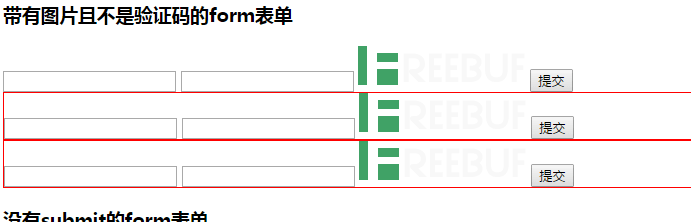
当存在 CSRF 漏洞的时候,会在 form 表单的外部包含一个红色的框,如图: