
Error retry in RxJS
Intro
I recently had a requirement: if a request times out, retry it, and the retry count should be configurable.
We send requests with Axios, and the request handling lives in a redux-observable epic.
There are two ways to implement retry:
- Add retry code in the
Axioswrapper - Use
RxJSoperators in theepic
Retrying in Axios is messy. I’d have to add retry into an already wrapped function, which feels wrong and is harder to maintain. So I used RxJS operators. The code here is a Demo, not project code, so it’s easier to follow.
RxJS error retry operators
RxJS provides two operators: retry and retryWhen.
Note: on retry, both operators retry the whole sequence.
Also, retry and retryWhen only catch Error. They don’t really work with Promise. I’ll cover the workaround later.
retry
retry sets how many times to retry. On error, it retries n times. Demo:
const source = Rx.Observable.interval(1000)
const example = source.map(val => {  if (val === 2) {    throw Error('error');  }  return val;}).retry(1)
example.subscribe({  next: val => console.log(val),  error: val => console.log(val.message)});
Run online (opens in a new tab)
This emits a number sequence every second. After subscribe, you get 0 after one second, 1 after two seconds, and so on.
Each value goes through map. When the value equals 2, it throws. Otherwise it returns the value unchanged, and it reaches next in subscribe.
Result:
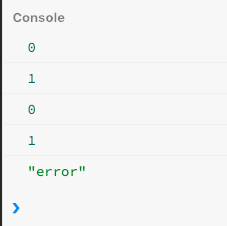
It emits 0 and 1 fine. When val is 2, it throws. retry catches it and reruns the whole RxJS sequence. So you see 0 and 1 again. Then 2 again, another error, but retry has no retries left, so it skips it. error in subscribe catches it and prints error.
retryWhen
retry only sets the retry count. Sometimes you want to log on retry, or do something else. retry isn’t a good fit then. That’s what retryWhen is for.
const source = Rx.Observable.interval(1000)
const example = source.map(val => {  if (val === 2) {    throw Error('error')  }  return val;}).retryWhen(err => {  return err    .do(() => console.log('retrying'))    .delay(2000)})
example.subscribe({  next: val => console.log(val),  error: val => console.log(val.message)});
Run online (opens in a new tab)
Result:

The emit logic is about the same. The handling is different.
We use retryWhen to control retry. do prints a string, then delay waits 2 seconds before retrying.
This retries forever. There’s no retry limit. The next section covers that.
retry + retryWhen
So retry can set the count, and retryWhen can set the logic.
What if we want both?
OK, first look at retryWhen. If it internally triggers Error or Completed, it stops retrying and passes that Error or Completed to subscribe. That’s a bit abstract, so here’s a Demo:
const source = Rx.Observable.interval(1000)
const example = source.map(val => {  if (val === 2) {    throw Error('error')  }  return val;}).retryWhen(err => {  return err    .scan((acc, curr) => {      if (acc > 2) {        throw curr      }      return acc + 1    }, 1)})
example.subscribe({  next: val => console.log(val),  error: val => console.log(val.message)});
Run online (opens in a new tab)
Result:
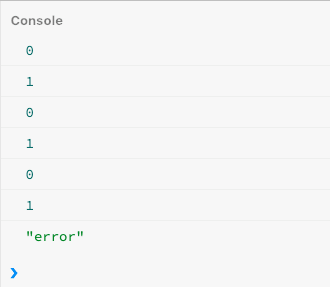
The emit logic is unchanged. There’s a new operator: scan. What does it do?
You can think of scan as javascript’s reduce. It takes two arguments: a callback and a default value. In the code above, the default is 1. First time acc is 1. Second retry, acc is 2. Third retry, acc is 3, which is greater than 2, so the if is true and it throws curr. curr is the original error. As I said, if scan throws Error, retry stops, subscribe gets it, error runs, and it prints error.
Re-throwing after the retry limit is the usual approach, so later operators can handle the error. Some requirements want Completed instead:
const source = Rx.Observable.interval(200)
const example = source.map(val => {  if (val === 2) {    throw Error('error')  }  return val;}).retryWhen(err => {  return err    .scan((acc, curr) => {      return acc + 1    }, 0)    .takeWhile(v => v <= 2)})
example.subscribe({  complete: () => console.log('Completed'),  next: val => console.log(val),  error: val => console.log(val.message)});
Run online (opens in a new tab)
Result:
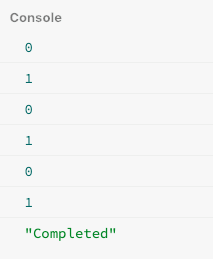
There’s a new operator takeWhile. It takes a function. If the function returns true, the value continues downstream. Once it returns false, it triggers complete in subscribe, meaning the sequence is done. That should make the code above clear.
Handling the Promise problem
I said retry and retryWhen don’t support Promise.reject(). That’s not quite accurate. Promise has no retry API. By the time you retry, the Promise is already running, so you can’t call that method again. That’s why retry and retryWhen can’t retry a Promise. The fix is simple.
Use the defer operator. Here’s what it does.
defer takes a function. The function doesn’t run until you subscribe. Each run is in its own space, so even with Promise, retry still works: it doesn’t reuse the previous result. It opens a new memory space, runs the function, and returns the result.
So you can write:
const getInfo: AxiosPromise = axios.get('http://xxx.com')const exp = defer(() => getInfo)  .retryWhen(err => {    return err.scan((acc, curr) => {      if (acc > 2) {        throw curr      }
      return acc + 1    }, 1)  })
example.subscribe({  next: val => console.log(val),  error: val => console.log(val.message)});
Reply to this post on X (opens in a new tab)View as Markdown